Posted by Rose Bush on February 28th, 2013
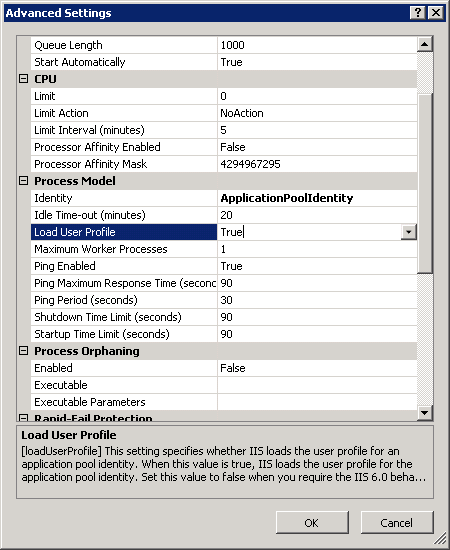
After fighting with this error for oh, 20 or so minutes, Exception Details: System.Security.SecurityException: Request for the permission of type ‘System.Web.AspNetHostingPermission, System, Version=2.0.0.0, Culture=neutral, PublicKeyToken=b77a5c561934e089’ failed.
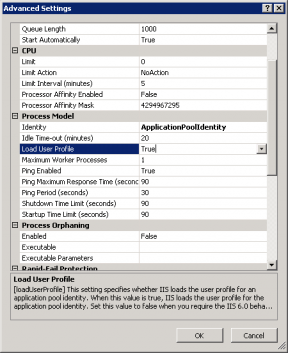
the end result was to go into the ApplicaitonPool Advanced Settings in IIS and set Load User Profile to True from False:
Filed under: Code or Hosting | Comment (0)
Posted by Rose Bush on February 26th, 2013
If you are moving between machines and want your WinZip 8 to go with you, check in ‘My Computer\HKEY_LOCAL_MACHINE\SOFTWARE\Nico Mak Computing\WinZip\WinIni’ or in ‘My Computer\HKEY_CURRENT_USER\SOFTWARE\Nico Mak Computing\WinZip\WinIni’ (Depending on the install method I beleive) and look for two fields to register, the Name field, and the SN field. These are all you will need, besides the old installers.
Filed under: Code or Hosting | Comment (0)
Posted by Rose Bush on February 26th, 2013
To update the schema of a single stored procedure, once on the database in question, you would need to run the following line:
|
|
ALTER SCHEMA destinationSchema TRANSFER sourceSchema.storedProcedure; |
Filed under: Code or Hosting | Comment (0)
Posted by Rose Bush on February 25th, 2013
Exception Details: System.Web.HttpException: Request is not available in this context
http://mvolo.com/iis7-integrated-mode-request-is-not-available-in-this-context-exception-in-applicationstart
I agree with the options given:
Change your application code to not use the request context (recommended).
Move the application to Classic mode (NOT recommended).
Change your application code to not use the request context (recommended).
OR:
Move the application to Classic mode (NOT recommended).
Filed under: Code or Hosting | Comment (0)
Posted by Rose Bush on February 25th, 2013
Filed under: Code or Hosting | Comment (0)
Posted by Rose Bush on February 25th, 2013
I have gotten the error of ‘regsrv32’ is not recognized as an internal or external command, a few times recently, and it turns out, I typo’d the command. I was typing in regsrv32 as aposed to regsvr32, yes, the ‘v’ and the ‘r’ were switched. Gah, stupid muscle memory.
Filed under: Code or Hosting | Comment (0)
Posted by Rose Bush on February 25th, 2013
In newer versions of Windows Server and IIS, Windows Server 2008 and forward (Windows Server 2008 RC0 supposedly did include this) and IIS7, IIS7.5 and forward, Server.CreateObject(“MSWC.NextLink”) will not work. The DLL required is not installed into the OS and the line will cause an error. To fix this, you can download the below zip (Originally obtained from http://www.dllbank.com/n/nextlink.dll-download.html):
[download id=”6″ ]
Unzip it, in the URL bar of the explorer window you have that the file is in, type in cmd and hit enter, this opens a command prompt in the current folder. Then type in
|
|
%SYSTEMROOT%\System32\regsvr32.exe nextlink.dll |
I was then able to get past the error. I did test the file using virustotal here. It has a zero Detection ratio.
Filed under: Code or Hosting | Comment (0)
Posted by Rose Bush on February 18th, 2013
I have been battling this one and am annoyed to find that support for FTPS was not included in Dreamweaver until CS5.5 was presented on April 12, 2011. Glad to say I was able to find a note on it.
Resources:
http://helpx.adobe.com/dreamweaver/using/connect-remote-server.html
http://en.wikipedia.org/wiki/Adobe_Creative_Suite#Creative_Suite_5.5
Filed under: Code or Hosting | Comment (0)