Posted by Rose Bush on November 28th, 2009
Per here:
http://www.dotnetcurry.com/ShowArticle.aspx?ID=185&AspxAutoDetectCookieSupport=1
In the command prompt cd to:
: C:\WINDOWS\Microsoft.NET\Framework\v2.0.50727
Or the specific path for your version,
Encryption:
|
|
aspnet_regiis.exe -pef "connectionStrings" "C:\Inetpub\wwwroot\YourWebSite" –prov "RSAProtectedConfigurationProvider" |
Decryption:
|
|
aspnet_regiis.exe -pdf "connectionStrings" "C:\Inetpub\wwwroot\YourWebSite" |
Notice the change in tag from pef for encryption and pdf for decryption as that messed me up.
In my example I had to run:
|
|
aspnet_regiis.exe -pdf "appSettings" "C:\Websites\ajsnto94" |
Filed under: Code or Hosting | Comment (0)
Posted by Rose Bush on November 27th, 2009
After restarting ColdFusion, and seeing it not a performance issue, I realized the file I was trying to save to was to a folder that did not exist.
Filed under: Code or Hosting | Comment (0)
Posted by Rose Bush on November 27th, 2009
Filed under: Blog | Comment (0)
Posted by Rose Bush on November 18th, 2009
One of two things, either the patch was not applied\incorrectly applied, seen here:
http://www.bennadel.com/blog/1289-ColdFusion-8-0-1-Bug-Coldfusion-Image-ImageWriter-ImageWritingException.htm
with CF stopped
or the path is wrong in the code, per our example:
http://www.hosting.com/support/cfusion/captcha/
destination=”tmp/readme#tc#.png”
being run from example.com/subfolder
would result int he file trying to be written to:
C:\Websites\userdir\subfolder\tmp\
Filed under: Code or Hosting | Comment (0)
Posted by Rose Bush on November 18th, 2009
Runtime error in lib/db.mvc @ [00000164:00000024]: lib/dbprim/stores.mv: Line 202: MvOPENVIEW: mysql_stmt_bind_results: Using unsupported buffer type: 246 (parameter: 27)
I run into this one once in a while and always have to remember to upgrade the MySQL driver to the latest.
Filed under: Code or Hosting | Comment (0)
Posted by Rose Bush on November 18th, 2009
When performing the callback, Google gets the following error:
401 – Unauthorized: Access is denied due to invalid credentials.
You do not have permission to view this directory or page using the credentials that you supplied.
I have not found the direct solution, but the workaround I have come up with is to put the page it calls back to in its own directory and disable basic authentication on that folder. The call back then completes. I recommend using a randomly generated folder name to prevent it from being stumbled upon by nefarious individuals.
Filed under: Code or Hosting | Comment (0)
Posted by Rose Bush on November 7th, 2009
Server Error in ‘/’ Application.
Validation of viewstate MAC failed. If this application is hosted by a Web Farm or cluster, ensure that <machineKey> configuration specifies the same validationKey and validation algorithm. AutoGenerate cannot be used in a cluster.
Description: An unhandled exception occurred during the execution of the current web request. Please review the stack trace for more information about the error and where it originated in the code.
Exception Details: System.Web.HttpException: Validation of viewstate MAC failed. If this application is hosted by a Web Farm or cluster, ensure that <machineKey> configuration specifies the same validationKey and validation algorithm. AutoGenerate cannot be used in a cluster.
This error can be cleared up in most cases by putting a machine Key (and associated details) into your web.config. If need be, you can generate a set of these details here:
http://aspnetresources.com/tools/keycreator.aspx
Filed under: Code or Hosting | Comments (2)
Posted by Rose Bush on November 4th, 2009
Microsoft VBScript runtime error ‘800a0046’
Permission denied
I recently had this error. Turns out the user running the script did not have write permissions to C:\Inetpub\mailroot\Pickup so the email could never be generated. I used Filemon to find this out: http://technet.microsoft.com/en-us/sysinternals/bb896642.aspx
Filed under: Code or Hosting | Comment (0)
Posted by Rose Bush on November 3rd, 2009
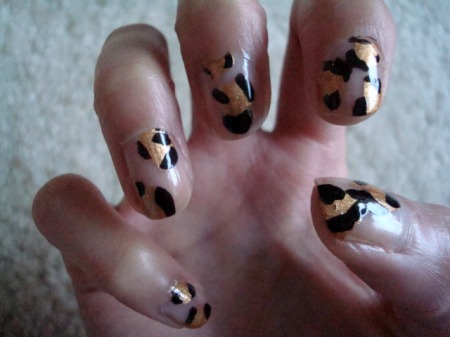
So despite the joking, having longer nails did not bother me. The only part I would do differently in the future is the color on them. After some talking with friends and Googling, I realized there is one pattern I could go with that would likely go unquestioned. Below are a few images I like, the first one is my favourite.


Filed under: Blog | Comment (1)