Posted by Rose Bush on May 19th, 2015
“ApplicationPoolIdentity is assigned membership of the Users group as well as the IIS_IUSRS group.” Source: http://stackoverflow.com/questions/5437723/iis-apppoolidentity-and-file-system-write-access-permissions
I often need to add Users in particular to give the permissions needed.
Filed under: Code or Hosting | Comment (0)
Posted by Rose Bush on March 25th, 2013
To resolve the error of HTTP Error 400.0 – Bad Request ASP.NET detected invalid characters in the URL , whether you are using Helicon Ape for url rewrites or not, is to make the following registry additions:
|
|
Windows Registry Editor Version 5.00 [HKEY_LOCAL_MACHINE\SOFTWARE\Microsoft\ASP.NET] "VerificationCompatibility"=dword:00000001 [HKEY_LOCAL_MACHINE\SYSTEM\CurrentControlSet\services\HTTP\Parameters] "AllowRestrictedChars"=dword:00000001 |
This will allow you to continue to use the & character the same as you had in IIS6.
Filed under: Code or Hosting | Comment (0)
Posted by Rose Bush on March 12th, 2013
I was getting the error of
RegAsm : error RA0000 : Unable to locate input assembly ‘c:\Windows\System32\Pay
flow_dotNET.dll’ or one of its dependencies.
when following instructions from installing the Payflow_dotNET.dll dll for .NET to use. As I was running this command:
C:\Windows\System32>c:\Windows\Microsoft.NET\Framework64\v2.0.50727\RegAsm.exe c:\Windows\System32\Payflow_dotNET.dll
There is an issue here, is that the dll, although there, was not all that usable for a 64 bit version of .NET, so I moved the file to
C:\Windows\SysWOW64
and from that folder within a command prompt was able to move forward:
C:\Windows\SysWOW64>c:\Windows\Microsoft.NET\Framework64\v2.0.50727\RegAsm.exe Payflow_dotNET.dll
Microsoft (R) .NET Framework Assembly Registration Utility 2.0.50727.5420
Copyright (C) Microsoft Corporation 1998-2004. All rights reserved.
Types registered successfully
Filed under: Code or Hosting | Comments (3)
Posted by Rose Bush on February 28th, 2013
After fighting with this error for oh, 20 or so minutes, Exception Details: System.Security.SecurityException: Request for the permission of type ‘System.Web.AspNetHostingPermission, System, Version=2.0.0.0, Culture=neutral, PublicKeyToken=b77a5c561934e089’ failed.
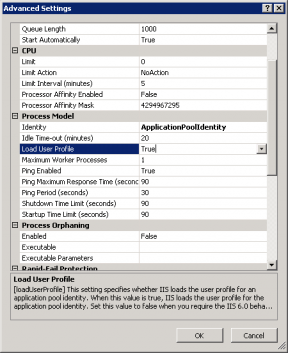
the end result was to go into the ApplicaitonPool Advanced Settings in IIS and set Load User Profile to True from False:
Filed under: Code or Hosting | Comment (0)
Posted by Rose Bush on February 25th, 2013
Exception Details: System.Web.HttpException: Request is not available in this context
http://mvolo.com/iis7-integrated-mode-request-is-not-available-in-this-context-exception-in-applicationstart
I agree with the options given:
Change your application code to not use the request context (recommended).
Move the application to Classic mode (NOT recommended).
Change your application code to not use the request context (recommended).
OR:
Move the application to Classic mode (NOT recommended).
Filed under: Code or Hosting | Comment (0)
Posted by Rose Bush on February 25th, 2013
Filed under: Code or Hosting | Comment (0)
Posted by Rose Bush on February 25th, 2013
In newer versions of Windows Server and IIS, Windows Server 2008 and forward (Windows Server 2008 RC0 supposedly did include this) and IIS7, IIS7.5 and forward, Server.CreateObject(“MSWC.NextLink”) will not work. The DLL required is not installed into the OS and the line will cause an error. To fix this, you can download the below zip (Originally obtained from http://www.dllbank.com/n/nextlink.dll-download.html):
[download id=”6″ ]
Unzip it, in the URL bar of the explorer window you have that the file is in, type in cmd and hit enter, this opens a command prompt in the current folder. Then type in
|
|
%SYSTEMROOT%\System32\regsvr32.exe nextlink.dll |
I was then able to get past the error. I did test the file using virustotal here. It has a zero Detection ratio.
Filed under: Code or Hosting | Comment (0)
Posted by Rose Bush on July 1st, 2009
1 2 3 4 5 6 7 8 9 10 11 12 13 14 15 16 17 18 19 20 21 |
Server Error in '/' Application. Configuration Error Description: An error occurred during the processing of a configuration file required to service this request. Please review the specific error details below and modify your configuration file appropriately. Parser Error Message: Could not load file or assembly 'System.Web.Entity, Version=3.5.0.0, Culture=neutral, PublicKeyToken=b77a5c561934e089' or one of its dependencies. The system cannot find the file specified. Source Error: Line 46: <add assembly="System.Xml.Linq, Version=3.5.0.0, Culture=neutral, PublicKeyToken=B77A5C561934E089"/> Line 47: <add assembly="System.Data.Linq, Version=3.5.0.0, Culture=neutral, PublicKeyToken=B77A5C561934E089"/> Line 48: <add assembly="System.Web.Entity, Version=3.5.0.0, Culture=neutral, PublicKeyToken=B77A5C561934E089"/> Line 49: <add assembly="System.Data.Entity, Version=3.5.0.0, Culture=neutral,PublicKeyToken=B77A5C561934E089"/></assemblies> Line 50: </compilation> |
This error message means you are trying to load the Assemblies likely found in .NET 3.5 Service pack one and the server you are on does not support nor include it. Easy to fix, download the zip file below, unzip it, create a folder named “bin” sans quotes in your webroot and place the 2 files within the zip into that folder. That’s it. I have taken these files from a server I had running the correct version. As with any download, be cautious and use at your own risk.
Click here for the zip file.
Filed under: Code or Hosting | Comments (4)