Posted by Rose Bush on March 26th, 2013
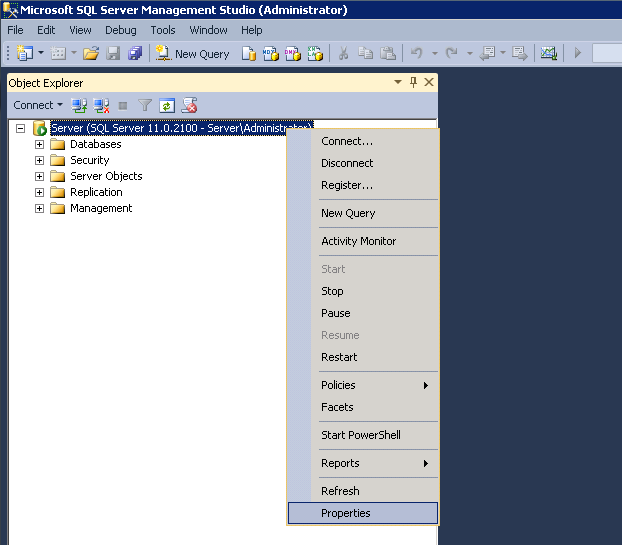
Open up SQL Server Management Studio and connect to the Database Engine (connection not pictured)

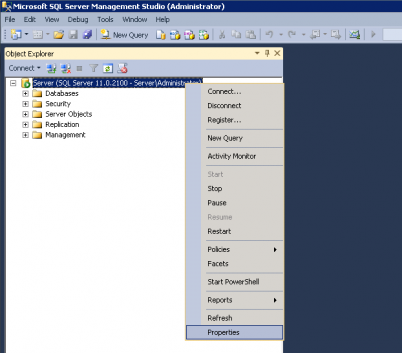
Right click on the instance and choose Properties from the menu.
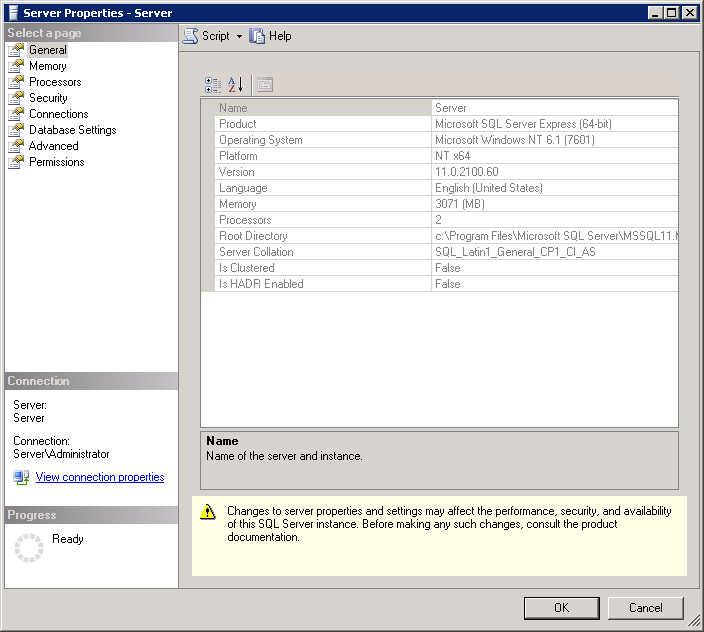
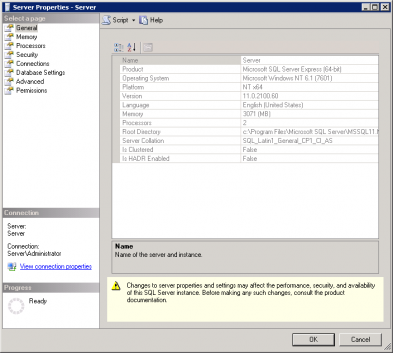
Here you can see the Product and the Version, as both are important details. If you are noting this for future reference I recommend noting the entire line of each. Keep in mind the Version does change as upgrades to SQL server are installed through KB’s and Windows Updates.
Filed under: Code or Hosting | Comment (0)
Posted by Rose Bush on March 26th, 2013
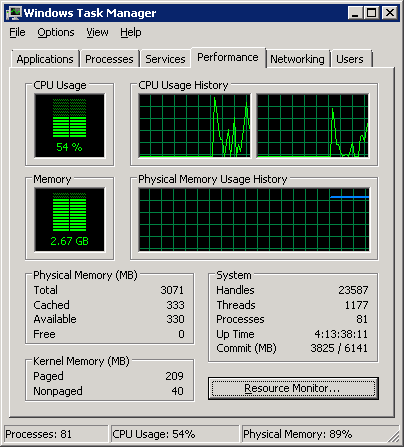
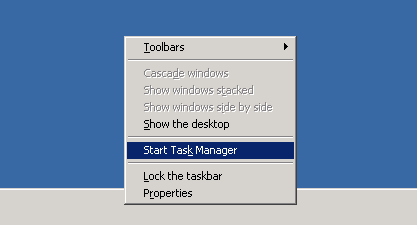
If you need to check the current CPU and RAM usage on Windows 2008, Windows 2008 R2 as well, it is a matter of right clicking on the Task Bar (Usually found on the bottom of the display) and selecting ‘Start Task Manager’:
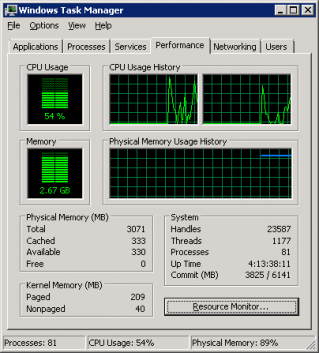
Here on the Windows Task Manager you can see current CPU usage, keep in mind this fluctuates a lot, as well as Memory usage. In this screen the 2.67 is the memory in use, and the total memory is listed as 3071 (actually 3GB). Both numbers are useful for reference Make note of the green bar graphs as they are easy indicators:
Filed under: Code or Hosting | Comment (0)
Posted by Rose Bush on March 25th, 2013
To resolve the error of HTTP Error 400.0 – Bad Request ASP.NET detected invalid characters in the URL , whether you are using Helicon Ape for url rewrites or not, is to make the following registry additions:
|
|
Windows Registry Editor Version 5.00 [HKEY_LOCAL_MACHINE\SOFTWARE\Microsoft\ASP.NET] "VerificationCompatibility"=dword:00000001 [HKEY_LOCAL_MACHINE\SYSTEM\CurrentControlSet\services\HTTP\Parameters] "AllowRestrictedChars"=dword:00000001 |
This will allow you to continue to use the & character the same as you had in IIS6.
Filed under: Code or Hosting | Comment (0)
Posted by Rose Bush on March 12th, 2013
I was getting the error of
RegAsm : error RA0000 : Unable to locate input assembly ‘c:\Windows\System32\Pay
flow_dotNET.dll’ or one of its dependencies.
when following instructions from installing the Payflow_dotNET.dll dll for .NET to use. As I was running this command:
C:\Windows\System32>c:\Windows\Microsoft.NET\Framework64\v2.0.50727\RegAsm.exe c:\Windows\System32\Payflow_dotNET.dll
There is an issue here, is that the dll, although there, was not all that usable for a 64 bit version of .NET, so I moved the file to
C:\Windows\SysWOW64
and from that folder within a command prompt was able to move forward:
C:\Windows\SysWOW64>c:\Windows\Microsoft.NET\Framework64\v2.0.50727\RegAsm.exe Payflow_dotNET.dll
Microsoft (R) .NET Framework Assembly Registration Utility 2.0.50727.5420
Copyright (C) Microsoft Corporation 1998-2004. All rights reserved.
Types registered successfully
Filed under: Code or Hosting | Comments (3)
Posted by Rose Bush on March 5th, 2013
rsync error: some files/attrs were not transferred (see previous errors) (code 23) at main.c(1039) [sender=3.0.6]
So, apparently I had not become root just yet. Whoops. Once I had ‘sudo su -‘ed, I could run the command no problem. If this did not solve your problem, please post a comment.
Filed under: Code or Hosting | Comment (0)
Posted by Rose Bush on March 4th, 2013
If you are trying to calculate total disk space in use by all databases within a given MSSQL instance, you can use the following script to determine this space.
|
|
SELECT CONVERT(DECIMAL(10,2),(SUM(size * 8.00) / 1024.00 / 1024.00)) As UsedSpace FROM master.sys.master_files |
It has been said that “Sys.Master_files is a server-wide view that lists every file in every DB. It’s available from SQL Server 2005 onward.”
Filed under: Code or Hosting | Comment (0)
Posted by Rose Bush on February 28th, 2013
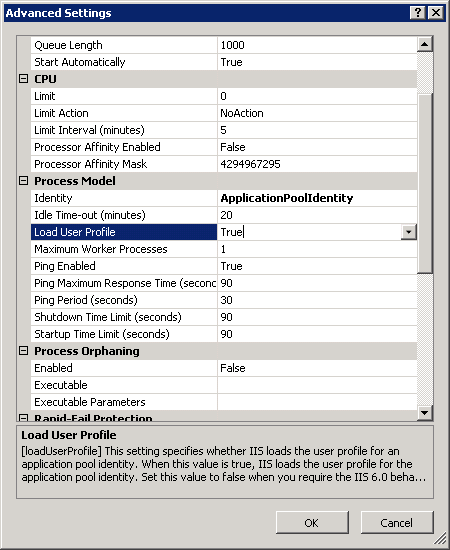
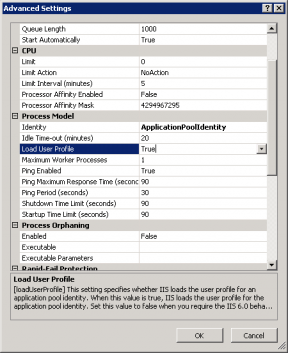
After fighting with this error for oh, 20 or so minutes, Exception Details: System.Security.SecurityException: Request for the permission of type ‘System.Web.AspNetHostingPermission, System, Version=2.0.0.0, Culture=neutral, PublicKeyToken=b77a5c561934e089’ failed.
the end result was to go into the ApplicaitonPool Advanced Settings in IIS and set Load User Profile to True from False:
Filed under: Code or Hosting | Comment (0)
Posted by Rose Bush on February 26th, 2013
If you are moving between machines and want your WinZip 8 to go with you, check in ‘My Computer\HKEY_LOCAL_MACHINE\SOFTWARE\Nico Mak Computing\WinZip\WinIni’ or in ‘My Computer\HKEY_CURRENT_USER\SOFTWARE\Nico Mak Computing\WinZip\WinIni’ (Depending on the install method I beleive) and look for two fields to register, the Name field, and the SN field. These are all you will need, besides the old installers.
Filed under: Code or Hosting | Comment (0)
Posted by Rose Bush on February 26th, 2013
To update the schema of a single stored procedure, once on the database in question, you would need to run the following line:
|
|
ALTER SCHEMA destinationSchema TRANSFER sourceSchema.storedProcedure; |
Filed under: Code or Hosting | Comment (0)
Posted by Rose Bush on February 25th, 2013
Exception Details: System.Web.HttpException: Request is not available in this context
http://mvolo.com/iis7-integrated-mode-request-is-not-available-in-this-context-exception-in-applicationstart
I agree with the options given:
Change your application code to not use the request context (recommended).
Move the application to Classic mode (NOT recommended).
Change your application code to not use the request context (recommended).
OR:
Move the application to Classic mode (NOT recommended).
Filed under: Code or Hosting | Comment (0)