If you edit a hosts entry on your server, you win, and if windows, you need not restart IIS as ASP.NET does not cache this resolution, PHP run as an apache module DOES require a restart of apache. Idk about other languages just yet, nor services tied to them.
Updating Local Host Entries and Web Server Caching
Posted by Rose Bush on April 30th, 2013
SQL Server FAQ
Posted by Rose Bush on April 18th, 2013
I wanted a place to throw a lot of the high level SQL FAQ and answers for issues I come to.
v=sql.70 7
v=sql.80 2000
v=sql.90 2005
v=sql.100 2008
v=sql.105 2008R2
v=sql.110 2012
v=sql.120 2014
v=sql.130 2016
This site lists build versions, this is really useful for matching version to version by running the updates needed manually:
Microsoft SQL Server 2012, 2008R2, 2008, 2005, 2000 and 7.0 Builds
SQL Server 2012 msdn: Editions and Components of SQL Server 2012
SQL Server 2008 R2 msdn: Editions and Components of SQL Server 2008 R2
Server Editions:
*Datacenter
*Enterprise
*Standard
Specialized Editions:
*SQL Server Developer
*SQL Server Workgroup
*SQL Server Web
*SQL Server Express (SQL Server Express with Tools, SQL Server Express with Advanced Services)
*Compact 3.5 SP1 (x86) Compact 3.1 (x86)
SQL Server 2008 msdn: Editions and Components of SQL Server 2008
SQL Server 2005 msdn: Editions and Components of SQL Server 2005
Anything else was too old for my purposes.
~~~~~~~~~~~~~~~~~~~~~~~~~~~~~~~~~~~~~~~~~
MSSQL Data links:
http://en.wikipedia.org/wiki/Microsoft_SQL_Server
Deprecated Database Engine Features in SQL Server 2012
http://msdn.microsoft.com/en-us/library/ms143729.aspx
Build version list, you have a version number and want to know what updates are in there:
http://sqlserverbuilds.blogspot.com/
Features Supported by the EditionhereherehereherehereNOPENOPENOPE
| SQL Server 2016 | SQL Server 2014 | SQL Server 2012 | SQL Server 2008 R2 | SQL Server 2008 |  |
SQL Server 2000 | SQL Server 7 | |
|---|---|---|---|---|---|---|---|---|
| Hardware and Software Requirements | here | here | here | here | here | |
NOPE | NOPE |
| Editions and Components | here | here | here | here | here | |
NOPE | NOPE |
Hardware and Software Requirements for Installing SQL Server 2012
http://msdn.microsoft.com/en-us/library/ms143506.aspx
Features Supported by the Editions of SQL Server 2008 R2
http://msdn.microsoft.com/en-us/library/cc645993(v=sql.105).aspx
Features Supported by the Editions of SQL Server 2012 (FYI SQL web does support SQL profiler some how?)
http://msdn.microsoft.com/en-us/library/cc645993(v=sql.110).aspx
Features Supported by the Editions of SQL Server 2014
http://msdn.microsoft.com/en-us/library/cc645993(v=sql.120).aspx
Features Supported by the Editions of SQL Server 2016
http://msdn.microsoft.com/en-us/library/cc645993(v=sql.130).aspx
Features Supported by the Editions of SQL Server 2005
http://msdn.microsoft.com/en-us/library/ms143761(v=sql.90).aspx
Prevent Truncation for Dynamically Generated T-SQL Results in SSMS
https://www.edwinbush.com/prevent-truncation-for-dynamically-generated-t-sql-results-in-ssms/
Migrating SQL Server Users
https://www.edwinbush.com/migrating-sql-server-users/
Solved: Java method security exception.A security exception occurred while invoking Java method on a “”java.lang.Class”” object. MethodName is getName. Possible cause: Either the createobject function and cfobject tag are disabled in the security sandbox or you are trying to create a class in the ColdFusion package and that is disabled.
Posted by Rose Bush on April 15th, 2013
I was getting this error in the exception log:
“Error”,”ajp-bio-8012-exec-37″,”04/12/13″,”11:51:15″,”mgtemplate”,”Java method security exception.A security exception occurred while invoking Java method on a “”java.lang.Class”” object. MethodName is getName. Possible cause: Either the createobject function and cfobject tag are disabled in the security sandbox or you are trying to create a class in the ColdFusion package and that is disabled. The specific sequence of files included or processed is: C:\inetpub\mgtemplate\RemotingService.cfc, line: 1 ”
coldfusion.runtime.StructBean$SecurityException: Java method security exception.
at coldfusion.runtime.StructBean.checkPermission(StructBean.java:96)
at coldfusion.runtime.StructBean.invoke(StructBean.java:482)
at coldfusion.runtime.CfJspPage._invoke(CfJspPage.java:2465)
at Statement870.evaluate(:1)
at coldfusion.runtime.CFPage.evaluateCondition(CFPage.java:9340)
at cfAbstractRemotingService2ecfc1188850940$funcRESETCFHTMLHEAD.runFunction(C:\inetpub\ModelGlue\gesture\remoting\AbstractRemotingService.cfc:59)
at coldfusion.runtime.UDFMethod.invoke(UDFMethod.java:472)
at coldfusion.filter.SilentFilter.invoke(SilentFilter.java:47)
at coldfusion.runtime.UDFMethod$ReturnTypeFilter.invoke(UDFMethod.java:405)
at coldfusion.runtime.UDFMethod$ArgumentCollectionFilter.invoke(UDFMethod.java:368)
at coldfusion.filter.FunctionAccessFilter.invoke(FunctionAccessFilter.java:55)
at coldfusion.runtime.UDFMethod.runFilterChain(UDFMethod.java:321)
at coldfusion.runtime.UDFMethod.invoke(UDFMethod.java:220)
at coldfusion.runtime.CfJspPage._invokeUDF(CfJspPage.java:2659)
at cfAbstractRemotingService2ecfc1188850940$funcEXECUTEEVENT.runFunction(C:\inetpub\ModelGlue\gesture\remoting\AbstractRemotingService.cfc:40)
at coldfusion.runtime.UDFMethod.invoke(UDFMethod.java:472)
at coldfusion.filter.SilentFilter.invoke(SilentFilter.java:47)
at coldfusion.runtime.UDFMethod$ReturnTypeFilter.invoke(UDFMethod.java:405)
at coldfusion.runtime.UDFMethod$ArgumentCollectionFilter.invoke(UDFMethod.java:368)
at coldfusion.filter.FunctionAccessFilter.invoke(FunctionAccessFilter.java:55)
at coldfusion.runtime.UDFMethod.runFilterChain(UDFMethod.java:321)
at coldfusion.runtime.UDFMethod.invoke(UDFMethod.java:220)
at coldfusion.runtime.CfJspPage._invokeUDF(CfJspPage.java:2659)
at coldfusion.runtime.CfJspPage._invoke(CfJspPage.java:2455)
at cfRemotingService2ecfc1182307450$funcEXECUTEEVENT.runFunction(C:\inetpub\mgtemplate\RemotingService.cfc:17)
at coldfusion.runtime.UDFMethod.invoke(UDFMethod.java:472)
at coldfusion.filter.SilentFilter.invoke(SilentFilter.java:47)
at coldfusion.runtime.UDFMethod$ReturnTypeFilter.invoke(UDFMethod.java:405)
at coldfusion.runtime.UDFMethod$ArgumentCollectionFilter.invoke(UDFMethod.java:368)
at coldfusion.filter.FunctionAccessFilter.invoke(FunctionAccessFilter.java:55)
at coldfusion.runtime.UDFMethod.runFilterChain(UDFMethod.java:321)
at coldfusion.runtime.UDFMethod.invoke(UDFMethod.java:518)
at coldfusion.runtime.TemplateProxy.invoke(TemplateProxy.java:660)
at coldfusion.runtime.TemplateProxy.invoke(TemplateProxy.java:469)
at coldfusion.filter.ComponentFilter.invoke(ComponentFilter.java:193)
at coldfusion.filter.ApplicationFilter.invoke(ApplicationFilter.java:436)
at coldfusion.filter.RequestMonitorFilter.invoke(RequestMonitorFilter.java:48)
at coldfusion.filter.MonitoringFilter.invoke(MonitoringFilter.java:40)
at coldfusion.filter.PathFilter.invoke(PathFilter.java:112)
at coldfusion.filter.ExceptionFilter.invoke(ExceptionFilter.java:94)
at coldfusion.filter.ClientScopePersistenceFilter.invoke(ClientScopePersistenceFilter.java:28)
at coldfusion.filter.BrowserFilter.invoke(BrowserFilter.java:38)
at coldfusion.filter.NoCacheFilter.invoke(NoCacheFilter.java:46)
at coldfusion.filter.GlobalsFilter.invoke(GlobalsFilter.java:38)
at coldfusion.filter.DatasourceFilter.invoke(DatasourceFilter.java:22)
at coldfusion.xml.rpc.CFCServlet.invoke(CFCServlet.java:155)
at coldfusion.xml.rpc.CFCServlet.doPost(CFCServlet.java:331)
at javax.servlet.http.HttpServlet.service(HttpServlet.java:641)
at javax.servlet.http.HttpServlet.service(HttpServlet.java:722)
at coldfusion.bootstrap.BootstrapServlet.service(BootstrapServlet.java:89)
at org.apache.catalina.core.ApplicationFilterChain.internalDoFilter(ApplicationFilterChain.java:305)
at org.apache.catalina.core.ApplicationFilterChain.doFilter(ApplicationFilterChain.java:210)
at coldfusion.monitor.event.MonitoringServletFilter.doFilter(MonitoringServletFilter.java:42)
at coldfusion.bootstrap.BootstrapFilter.doFilter(BootstrapFilter.java:46)
at org.apache.catalina.core.ApplicationFilterChain.internalDoFilter(ApplicationFilterChain.java:243)
at org.apache.catalina.core.ApplicationFilterChain.doFilter(ApplicationFilterChain.java:210)
at org.apache.catalina.core.StandardWrapperValve.invoke(StandardWrapperValve.java:224)
at org.apache.catalina.core.StandardContextValve.invoke(StandardContextValve.java:169)
at org.apache.catalina.authenticator.AuthenticatorBase.invoke(AuthenticatorBase.java:472)
at org.apache.catalina.core.StandardHostValve.invoke(StandardHostValve.java:168)
at org.apache.catalina.valves.ErrorReportValve.invoke(ErrorReportValve.java:98)
at org.apache.catalina.valves.AccessLogValve.invoke(AccessLogValve.java:928)
at org.apache.catalina.core.StandardEngineValve.invoke(StandardEngineValve.java:118)
at org.apache.catalina.connector.CoyoteAdapter.service(CoyoteAdapter.java:414)
at org.apache.coyote.ajp.AjpProcessor.process(AjpProcessor.java:204)
at org.apache.coyote.AbstractProtocol$AbstractConnectionHandler.process(AbstractProtocol.java:539)
at org.apache.tomcat.util.net.JIoEndpoint$SocketProcessor.run(JIoEndpoint.java:298)
at java.util.concurrent.ThreadPoolExecutor$Worker.runTask(ThreadPoolExecutor.java:886)
at java.util.concurrent.ThreadPoolExecutor$Worker.run(ThreadPoolExecutor.java:908)
at java.lang.Thread.run(Thread.java:662)
I was also watching the server and saw that coldfusion.exe was attempting these file touches per procmon.exe:
11:08:40.3218412 AM coldfusion.exe 2864 CreateFile C:\ColdFusion10\cfusion\lib\coldfusion\runtime\StructBean.SecurityException_en_US.properties PATH NOT FOUND Desired Access: Read Attributes, Disposition: Open, Options: Open Reparse Point, Attributes: n/a, ShareMode: Read, Write, Delete, AllocationSize: n/a
11:08:40.3223507 AM coldfusion.exe 2864 CreateFile C:\ColdFusion10\cfusion\lib\axis2\coldfusion\runtime\StructBean.SecurityException_en_US.properties PATH NOT FOUND Desired Access: Read Attributes, Disposition: Open, Options: Open Reparse Point, Attributes: n/a, ShareMode: Read, Write, Delete, AllocationSize: n/a
11:08:40.3224855 AM coldfusion.exe 2864 CreateFile C:\ColdFusion10\cfusion\gateway\lib\coldfusion\runtime\StructBean.SecurityException_en_US.properties PATH NOT FOUND Desired Access: Read Attributes, Disposition: Open, Options: Open Reparse Point, Attributes: n/a, ShareMode: Read, Write, Delete, AllocationSize: n/a
11:08:40.3226892 AM coldfusion.exe 2864 CreateFile C:\ColdFusion10\cfusion\wwwroot\WEB-INF\cfform\jars\coldfusion\runtime\StructBean.SecurityException_en_US.properties PATH NOT FOUND Desired Access: Read Attributes, Disposition: Open, Options: Open Reparse Point, Attributes: n/a, ShareMode: Read, Write, Delete, AllocationSize: n/a
11:08:40.3228584 AM coldfusion.exe 2864 CreateFile C:\ColdFusion10\cfusion\wwwroot\WEB-INF\flex\jars\coldfusion\runtime\StructBean.SecurityException_en_US.properties PATH NOT FOUND Desired Access: Read Attributes, Disposition: Open, Options: Open Reparse Point, Attributes: n/a, ShareMode: Read, Write, Delete, AllocationSize: n/a
11:08:40.3229917 AM coldfusion.exe 2864 CreateFile C:\ColdFusion10\cfusion\lib\lib\coldfusion\runtime\StructBean.SecurityException_en_US.properties PATH NOT FOUND Desired Access: Read Attributes, Disposition: Open, Options: Open Reparse Point, Attributes: n/a, ShareMode: Read, Write, Delete, AllocationSize: n/a
11:08:40.3231216 AM coldfusion.exe 2864 CreateFile C:\ColdFusion10\cfusion\lib\oosdk\bin\coldfusion\runtime\StructBean.SecurityException_en_US.properties PATH NOT FOUND Desired Access: Read Attributes, Disposition: Open, Options: Open Reparse Point, Attributes: n/a, ShareMode: Read, Write, Delete, AllocationSize: n/a
11:08:40.3232705 AM coldfusion.exe 2864 CreateFile C:\ColdFusion10\cfusion\lib\oosdk\lib\coldfusion\runtime\StructBean.SecurityException_en_US.properties PATH NOT FOUND Desired Access: Read Attributes, Disposition: Open, Options: Open Reparse Point, Attributes: n/a, ShareMode: Read, Write, Delete, AllocationSize: n/a
11:08:40.3234821 AM coldfusion.exe 2864 CreateFile C:\ColdFusion10\cfusion\lib\oosdk\classes\coldfusion\runtime\StructBean.SecurityException_en_US.properties PATH NOT FOUND Desired Access: Read Attributes, Disposition: Open, Options: Open Reparse Point, Attributes: n/a, ShareMode: Read, Write, Delete, AllocationSize: n/a
11:08:40.3236827 AM coldfusion.exe 2864 CreateFile C:\ColdFusion10\cfusion\wwwroot\WEB-INF\classes\coldfusion\runtime\StructBean.SecurityException_en_US.properties PATH NOT FOUND Desired Access: Read Attributes, Disposition: Open, Options: Open Reparse Point, Attributes: n/a, ShareMode: Read, Write, Delete, AllocationSize: n/a
11:08:40.3239420 AM coldfusion.exe 2864 CreateFile C:\ColdFusion10\cfusion\lib\oosdk\lib\coldfusion\runtime\StructBean.SecurityException_en_US.properties PATH NOT FOUND Desired Access: Read Attributes, Disposition: Open, Options: Open Reparse Point, Attributes: n/a, ShareMode: Read, Write, Delete, AllocationSize: n/a
11:08:40.3241352 AM coldfusion.exe 2864 CreateFile C:\ColdFusion10\cfusion\lib\oosdk\classes\coldfusion\runtime\StructBean.SecurityException_en_US.properties PATH NOT FOUND Desired Access: Read Attributes, Disposition: Open, Options: Open Reparse Point, Attributes: n/a, ShareMode: Read, Write, Delete, AllocationSize: n/a
11:08:40.3243784 AM coldfusion.exe 2864 CreateFile C:\ColdFusion10\cfusion\lib\oosdk\lib\coldfusion\runtime\StructBean.SecurityException_en_US.properties PATH NOT FOUND Desired Access: Read Attributes, Disposition: Open, Options: Open Reparse Point, Attributes: n/a, ShareMode: Read, Write, Delete, AllocationSize: n/a
11:08:40.3246013 AM coldfusion.exe 2864 CreateFile C:\ColdFusion10\cfusion\lib\oosdk\classes\coldfusion\runtime\StructBean.SecurityException_en_US.properties PATH NOT FOUND Desired Access: Read Attributes, Disposition: Open, Options: Open Reparse Point, Attributes: n/a, ShareMode: Read, Write, Delete, AllocationSize: n/a
11:08:40.3248251 AM coldfusion.exe 2864 CreateFile C:\ColdFusion10\cfusion\lib\coldfusion\runtime\StructBean.SecurityException_en.properties PATH NOT FOUND Desired Access: Read Attributes, Disposition: Open, Options: Open Reparse Point, Attributes: n/a, ShareMode: Read, Write, Delete, AllocationSize: n/a
11:08:40.3252732 AM coldfusion.exe 2864 CreateFile C:\ColdFusion10\cfusion\lib\axis2\coldfusion\runtime\StructBean.SecurityException_en.properties PATH NOT FOUND Desired Access: Read Attributes, Disposition: Open, Options: Open Reparse Point, Attributes: n/a, ShareMode: Read, Write, Delete, AllocationSize: n/a
11:08:40.3254280 AM coldfusion.exe 2864 CreateFile C:\ColdFusion10\cfusion\gateway\lib\coldfusion\runtime\StructBean.SecurityException_en.properties PATH NOT FOUND Desired Access: Read Attributes, Disposition: Open, Options: Open Reparse Point, Attributes: n/a, ShareMode: Read, Write, Delete, AllocationSize: n/a
11:08:40.3256051 AM coldfusion.exe 2864 CreateFile C:\ColdFusion10\cfusion\wwwroot\WEB-INF\cfform\jars\coldfusion\runtime\StructBean.SecurityException_en.properties PATH NOT FOUND Desired Access: Read Attributes, Disposition: Open, Options: Open Reparse Point, Attributes: n/a, ShareMode: Read, Write, Delete, AllocationSize: n/a
11:08:40.3257616 AM coldfusion.exe 2864 CreateFile C:\ColdFusion10\cfusion\wwwroot\WEB-INF\flex\jars\coldfusion\runtime\StructBean.SecurityException_en.properties PATH NOT FOUND Desired Access: Read Attributes, Disposition: Open, Options: Open Reparse Point, Attributes: n/a, ShareMode: Read, Write, Delete, AllocationSize: n/a
11:08:40.3259245 AM coldfusion.exe 2864 CreateFile C:\ColdFusion10\cfusion\lib\lib\coldfusion\runtime\StructBean.SecurityException_en.properties PATH NOT FOUND Desired Access: Read Attributes, Disposition: Open, Options: Open Reparse Point, Attributes: n/a, ShareMode: Read, Write, Delete, AllocationSize: n/a
11:08:40.3260489 AM coldfusion.exe 2864 CreateFile C:\ColdFusion10\cfusion\lib\oosdk\bin\coldfusion\runtime\StructBean.SecurityException_en.properties PATH NOT FOUND Desired Access: Read Attributes, Disposition: Open, Options: Open Reparse Point, Attributes: n/a, ShareMode: Read, Write, Delete, AllocationSize: n/a
11:08:40.3261651 AM coldfusion.exe 2864 CreateFile C:\ColdFusion10\cfusion\lib\oosdk\lib\coldfusion\runtime\StructBean.SecurityException_en.properties PATH NOT FOUND Desired Access: Read Attributes, Disposition: Open, Options: Open Reparse Point, Attributes: n/a, ShareMode: Read, Write, Delete, AllocationSize: n/a
11:08:40.3262954 AM coldfusion.exe 2864 CreateFile C:\ColdFusion10\cfusion\lib\oosdk\classes\coldfusion\runtime\StructBean.SecurityException_en.properties PATH NOT FOUND Desired Access: Read Attributes, Disposition: Open, Options: Open Reparse Point, Attributes: n/a, ShareMode: Read, Write, Delete, AllocationSize: n/a
11:08:40.3265052 AM coldfusion.exe 2864 CreateFile C:\ColdFusion10\cfusion\wwwroot\WEB-INF\classes\coldfusion\runtime\StructBean.SecurityException_en.properties PATH NOT FOUND Desired Access: Read Attributes, Disposition: Open, Options: Open Reparse Point, Attributes: n/a, ShareMode: Read, Write, Delete, AllocationSize: n/a
11:08:40.3266873 AM coldfusion.exe 2864 CreateFile C:\ColdFusion10\cfusion\lib\oosdk\lib\coldfusion\runtime\StructBean.SecurityException_en.properties PATH NOT FOUND Desired Access: Read Attributes, Disposition: Open, Options: Open Reparse Point, Attributes: n/a, ShareMode: Read, Write, Delete, AllocationSize: n/a
11:08:40.3268189 AM coldfusion.exe 2864 CreateFile C:\ColdFusion10\cfusion\lib\oosdk\classes\coldfusion\runtime\StructBean.SecurityException_en.properties PATH NOT FOUND Desired Access: Read Attributes, Disposition: Open, Options: Open Reparse Point, Attributes: n/a, ShareMode: Read, Write, Delete, AllocationSize: n/a
11:08:40.3270259 AM coldfusion.exe 2864 CreateFile C:\ColdFusion10\cfusion\lib\oosdk\lib\coldfusion\runtime\StructBean.SecurityException_en.properties PATH NOT FOUND Desired Access: Read Attributes, Disposition: Open, Options: Open Reparse Point, Attributes: n/a, ShareMode: Read, Write, Delete, AllocationSize: n/a
11:08:40.3271909 AM coldfusion.exe 2864 CreateFile C:\ColdFusion10\cfusion\lib\oosdk\classes\coldfusion\runtime\StructBean.SecurityException_en.properties PATH NOT FOUND Desired Access: Read Attributes, Disposition: Open, Options: Open Reparse Point, Attributes: n/a, ShareMode: Read, Write, Delete, AllocationSize: n/a
I compared ColdFusion versions, settings, JVM configs and settings and versions. I was at a loss. It turns out, within the ColdFusion Administrator the check box for the below was checked:
Disable access to internal ColdFusion Java components
Disables the ability for CFML code to access and create Java objects that are part of the internal ColdFusion implementation. This prevents an unauthenticated CFML template from reading or modifying administration and configuration information for this server.

Once I unchecked this and saved my settings, the section on the site worked.
Easily test connectivity to MSSQL Server
Posted by Rose Bush on April 9th, 2013
I have run into a number of cases where I want to test a connection to a SQL (MSSQL) Server without having to resort to code. To do so is rather straight forward:
Create a new file, a simple txt file is fine, and rename the document to “TestDBConnection.udl” sans quotes and spaces.
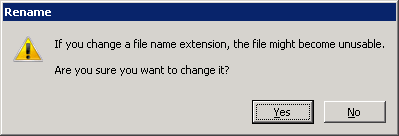
Be sure to change its file extension to .udl as many windows systems will not show you the extension. If you are in Explorer in Windows 7 I can tell you the commands to get to the setting are Alt, T, O, CTRL + Tab. Here you can see the ‘Hide extensions for known file types’.
Open the file:
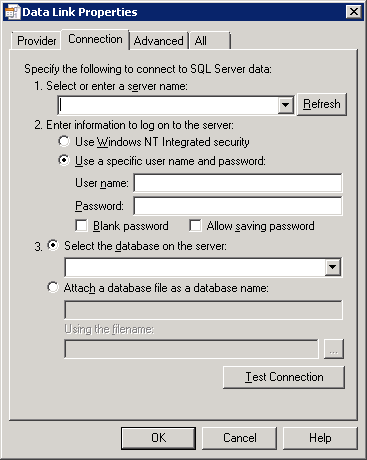
Under Connection, enter the SQL server hostname or IP
If testing a SQL alias:
Enter information to log on to the server”
*Choose Windows Authenticated security
Click the Refresh button.
If a successful connection was made, a list of databases will be accessible under section 3.
Otherwise, test as you would guess, it is fairly clear from here.
Obtaining Usage Information on *nix Systems
Posted by Rose Bush on April 5th, 2013
When obtaining usage information, there are primarily 3 details you want to look at (for my needs, yours may vary) being CPU, RAM, Hard Disk. On many systems you can use the below commands:
|
1 2 3 |
cat /proc/cpuinfo | grep processor | wc -l free df -h |
On newer machines ( I think RHEL 6 and newer) you can use nproc in place of the first command:
|
1 2 3 |
nproc free df -h |
There is also this very straight forward method below:
|
1 |
HOSTNAME=$(hostname | tr [A-Z] [a-z] | sed -e 's/.example.com//'); PROCS=$(cat /proc/cpuinfo | grep processor | wc -l); MEMTOTAL=$(echo "scale = 2; $(free | grep 'Mem:' | awk '{print $2}')/1048576" | bc); MEMUSED=$(echo "scale = 2; $(free | grep 'Mem:' | awk '{print $3}')/1048576" | bc); HDTOTAL=$(df -h | grep -v 'nas' | grep "/\$" | awk '{print $1}'); HDUSED=$(df -h | grep -v 'nas' | grep "/\$" | awk '{print $2}'); echo -e '\n\n'$HOSTNAME':\nCPU: '$PROCS' cores\nRAM: '$MEMUSED'G Used / '$MEMTOTAL'G Total\nHD: '$HDUSED' Used / '$HDTOTAL' Total\n' |
Faulting application name: cygrunsrv.exe, version: 0.0.0.0, time stamp: 0x40826252 Faulting module name: ntdll.dll, version: 6.1.7601.17725, time stamp: 0x4ec49b8f
Posted by Rose Bush on April 4th, 2013
Okay, ran into this issue and had errors in numerous places, errors consisted of 2 Information items in the event viewer:
Faulting application name: cygrunsrv.exe, version: 0.0.0.0, time stamp: 0x40826252
Faulting module name: ntdll.dll, version: 6.1.7601.17725, time stamp: 0x4ec49b8f
Exception code: 0xc0000005
Fault offset: 0x00033de8
Faulting process id: 0x1864
Faulting application start time: 0x01ce3154ee337ce8
Faulting application path: C:\Program Files (x86)\OpenSSH\bin\cygrunsrv.exe
Faulting module path: C:\Windows\SysWOW64\ntdll.dll
Report Id: 2be26929-9d48-11e2-a7c5-d4ae52c404bf
Fault bucket , type 0
Event Name: APPCRASH
Response: Not available
Cab Id: 0
Problem signature:
P1: cygrunsrv.exe
P2: 0.0.0.0
P3: 40826252
P4: ntdll.dll
P5: 6.1.7601.17725
P6: 4ec49b8f
P7: c0000005
P8: 00033de8
P9:
P10:
Attached files:
These files may be available here:
C:\ProgramData\Microsoft\Windows\WER\ReportQueue\AppCrash_cygrunsrv.exe_4970cdd197632cbc7d2bc9ea611f2a78a24963_0ae8a1c9
Analysis symbol:
Rechecking for solution: 0
Report Id: 2be26929-9d48-11e2-a7c5-d4ae52c404bf
Report Status: 4
And an actual error in the event viewer:
Fault bucket , type 0
Event Name: APPCRASH
Response: Not available
Cab Id: 0
Problem signature:
P1: cygrunsrv.exe
P2: 0.0.0.0
P3: 40826252
P4: ntdll.dll
P5: 6.1.7601.17725
P6: 4ec49b8f
P7: c0000005
P8: 00033de8
P9:
P10:
Attached files:
These files may be available here:
C:\ProgramData\Microsoft\Windows\WER\ReportQueue\AppCrash_cygrunsrv.exe_4970cdd197632cbc7d2bc9ea611f2a78a24963_0ae8a1c9
Analysis symbol:
Rechecking for solution: 0
Report Id: 2be26929-9d48-11e2-a7c5-d4ae52c404bf
Report Status: 0
Then in C:\ProgramData\Microsoft\Windows\WER\ReportQueue\AppCrash_cygrunsrv.exe_4970cdd197632cbc7d2bc9ea611f2a78a24963_0ae8a1c9
I find a Report.wer file, once opened I can see this:
Version=1
EventType=APPCRASH
EventTime=130095680084486700
ReportType=2
Consent=1
ReportIdentifier=2be2692a-9d48-11e2-a7c5-d4ae52c404bf
IntegratorReportIdentifier=2be26929-9d48-11e2-a7c5-d4ae52c404bf
WOW64=1
Response.type=4
Sig[0].Name=Application Name
Sig[0].Value=cygrunsrv.exe
Sig[1].Name=Application Version
Sig[1].Value=0.0.0.0
Sig[2].Name=Application Timestamp
Sig[2].Value=40826252
Sig[3].Name=Fault Module Name
Sig[3].Value=ntdll.dll
Sig[4].Name=Fault Module Version
Sig[4].Value=6.1.7601.17725
Sig[5].Name=Fault Module Timestamp
Sig[5].Value=4ec49b8f
Sig[6].Name=Exception Code
Sig[6].Value=c0000005
Sig[7].Name=Exception Offset
Sig[7].Value=00033de8
DynamicSig[1].Name=OS Version
DynamicSig[1].Value=6.1.7601.2.1.0.272.7
DynamicSig[2].Name=Locale ID
DynamicSig[2].Value=1033
DynamicSig[22].Name=Additional Information 1
DynamicSig[22].Value=b2c5
DynamicSig[23].Name=Additional Information 2
DynamicSig[23].Value=b2c5b5c5ee4f3dfe48897bfbd1f9aa32
DynamicSig[24].Name=Additional Information 3
DynamicSig[24].Value=916c
DynamicSig[25].Name=Additional Information 4
DynamicSig[25].Value=916cf0f8a1374ec2302febca9ee94acf
UI[2]=C:\Program Files (x86)\OpenSSH\bin\cygrunsrv.exe
UI[5]=Check online for a solution (recommended)
UI[6]=Check for a solution later (recommended)
UI[7]=Close
UI[8]=cygrunsrv.exe stopped working and was closed
UI[9]=A problem caused the application to stop working correctly. Windows will notify you if a solution is available.
UI[10]=&Close
LoadedModule[0]=C:\Program Files (x86)\OpenSSH\bin\cygrunsrv.exe
LoadedModule[1]=C:\Windows\SysWOW64\ntdll.dll
LoadedModule[2]=C:\Windows\syswow64\kernel32.dll
LoadedModule[3]=C:\Windows\syswow64\KERNELBASE.dll
LoadedModule[4]=C:\Program Files (x86)\OpenSSH\bin\cygwin1.dll
LoadedModule[5]=C:\Windows\syswow64\ADVAPI32.DLL
LoadedModule[6]=C:\Windows\syswow64\msvcrt.dll
LoadedModule[7]=C:\Windows\SysWOW64\sechost.dll
LoadedModule[8]=C:\Windows\syswow64\RPCRT4.dll
LoadedModule[9]=C:\Windows\syswow64\SspiCli.dll
LoadedModule[10]=C:\Windows\syswow64\CRYPTBASE.dll
LoadedModule[11]=C:\Windows\syswow64\USER32.dll
LoadedModule[12]=C:\Windows\syswow64\GDI32.dll
LoadedModule[13]=C:\Windows\syswow64\LPK.dll
LoadedModule[14]=C:\Windows\syswow64\USP10.dll
LoadedModule[15]=C:\Windows\system32\IMM32.DLL
LoadedModule[16]=C:\Windows\syswow64\MSCTF.dll
LoadedModule[17]=C:\PROGRA~2\Sophos\SOPHOS~1\SOPHOS~1.DLL
LoadedModule[18]=C:\Windows\syswow64\PSAPI.DLL
FriendlyEventName=Stopped working
ConsentKey=APPCRASH
AppName=cygrunsrv.exe
AppPath=C:\Program Files (x86)\OpenSSH\bin\cygrunsrv.exe
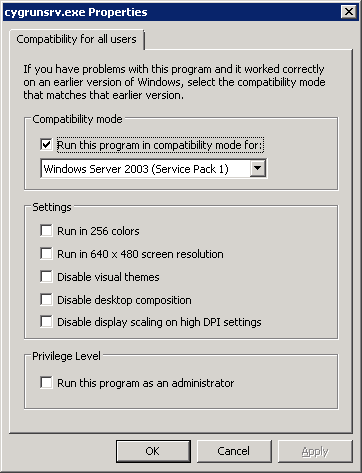
The fix was to update the settings of the cygrunsrv.exe file:
Go to the C:\Program Files (x86)\OpenSSH\bin\ path and right click cygrunsrv.exe.
Go to Properties
Go to Compatibility
Click ‘Change settings for all users’
Check the box for ‘Run this program in compatibility mode for:’
Set the dropdown to ‘Windows Server 2003 (Service Pack 1)’.
Save your changes and you should now be able to start the service.
Adding the Administrators group within SQL Server
Posted by Rose Bush on April 1st, 2013
If you want to add the group Administrators to SQL so that any user of the Administrators Group can use SQL server, the below code, once executed, will perform this for you:
|
1 2 3 4 |
CREATE LOGIN [BUILTIN\Administrators] FROM WINDOWS WITH DEFAULT_DATABASE=[master] GO EXEC master..sp_addsrvrolemember @loginame = N'BUILTIN\Administrators', @rolename = N'sysadmin' GO |
Copyright © 2026 Edventures in Normalcy. All rights reserved.