Edventures in Normalcy

Setting up SmarterMail 8 as a site in IIS7 as apposed to a Service is rather straight forward.  SmarterTools has this article here:

http://portal.smartertools.com/KB/a1485/set-up-smartermail-as-a-site-in-iis-70.aspx

I decided to go once step further and make this scripted:


32bit:

And 64bit:

On a side note, in certain cases, I had to change the application pool back to Classic Mode.  IDK why, if you figure it out, pls tell me!

Ok, as of last I think I fount the inconsistency.  The application pool is not getting updated to run as NetworkService, alternative command to give us desired result:


Site Issues

Posted by Rose Bush on January 24th, 2013

To all of my readers, as few of you as there may be, I am clearly re working many facets of my site in order to realign it with its intended purpose. I am correcting core underlying issues that have gone unmaintained for too long. Items to expect in the future from this, less buggy interface for all sections generated. SSL Support across the entire site. Better image handling in posts. Improved SEO tags for better rankings. And some day, I hope to obtain the domain rosebush.com, although the owner has not been responsive to the 1 email I have sent them so far. I will need to try again.

Energy Drink Collection

Posted by Rose Bush on January 21st, 2013

IMG_1436

IMG_1439


I had collected the above drinks, and more at other times, but the above was what had survived (initially).  After a basement water issue, they were pulled out, cleaned and placed as you see here.  As I had too many ‘collections’, this being one of my lesser appreciated ones, I got rid of most of them, keeping less than 5 for myself.  If you wanted the collection, I feel bad for you, I couldn’t find anyone to take them after trying for about a month through various avenues.

I have recently run into an issue where I run one script that generated another (T-SQL), and for some reason, some of the output is cut off or truncated in SSMS.  I want to prevent this.  This truncation is caused by the settings below being too low for your case.  Altering these setting will significantly decrease the chance of truncation when creating T-SQL scripts in a loop.  Initially I was changing this in one place, and still had the truncation effect me.  Silly me, there are TWO place where you have to change the limit in order to make it function in all scenarios.

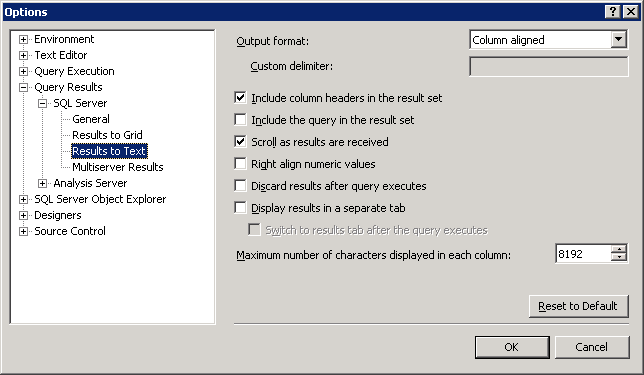
This one I do catch, Tools > Options. Expand the path of Query Results > SQL Server > Results to Text and change the Maximum number of characters displayed in each column to the fields maximum of 8192.
SSMS_Tools_Options_Query_Results_to_Text

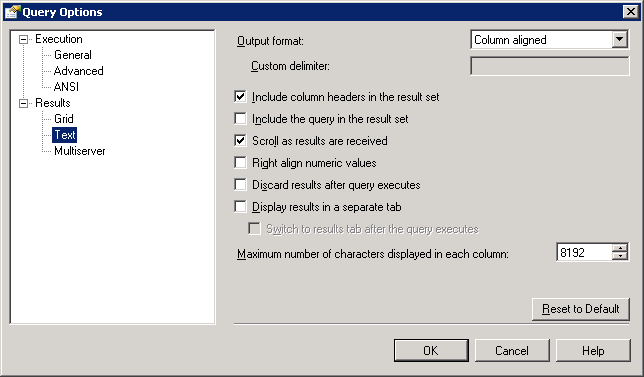
The second setting is the one I tend to fail to remember.  This is not just because the Query menu does not show in SSMS if a query window is not open or if you have clicked off the query window to the Object Explorer pane, for example. Open a new query window and ensure it has the focus, then go to Query > Query Options. Here you can see the setting is located in Results > Text.  Change the Maximum number of characters displayed in each column the fields maximum of 8192.
SSMS_Query_Options_Results_Text

“NOTE: Keep in mind that when you make a setting change for Query Options, it only applies to that immediate window and any new windows you open. It will not affect the options for any other query windows which were open at the time but did not have the focus.”

Compare Two Facebook Users to Find Common Friends

Posted by Rose Bush on January 8th, 2013

I recently went to find if two of my friends have the same friends, other than me. To get to the compare page for you and a friend, go to your friend’s wall. Click the down arrow on the Messages button and choose “see friendship”. Supposedly, once the page has loaded if you look in the same area on the right you will see another box which will allow you to compare other friendships.

You could also just replace the ‘[username1]’ and ‘[username2]’ fields below and browse to it.

https://www.facebook.com/[username1]?and=[username2]

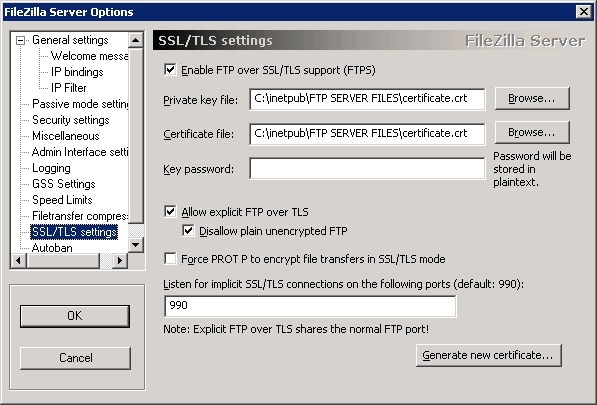
So, I have a default (mostly) install of FileZilla Server:

FileZilla_Server_0.9.37_beta_SSL_TLS_settings_screen


I can connect just fine using FileZilla Client, but not Cyberduck (originally on a Mac, but I replicated the issue on Windows).

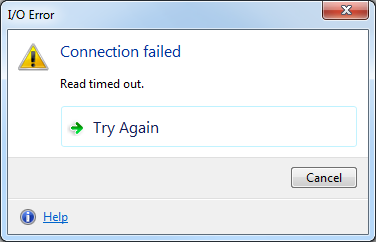
I kept getting this error:
Cyberduck_FTP_SSL_Read_timed_out

Very useful, obviously, the log on the server only shows this:

(000098)1/7/2013 15:49:37 PM – (not logged in) (127.0.0.1)> Connected, sending welcome message…
(000098)1/7/2013 15:49:37 PM – (not logged in) (127.0.0.1)> disconnected.

My setup was straight forward, for FileZilla:

Host: [remove here in this post]

Port: 990

Protocol: FTP

Encryption: Require implicit FTP over TLS

Username: [remove here in this post]

Password: [remove here in this post]

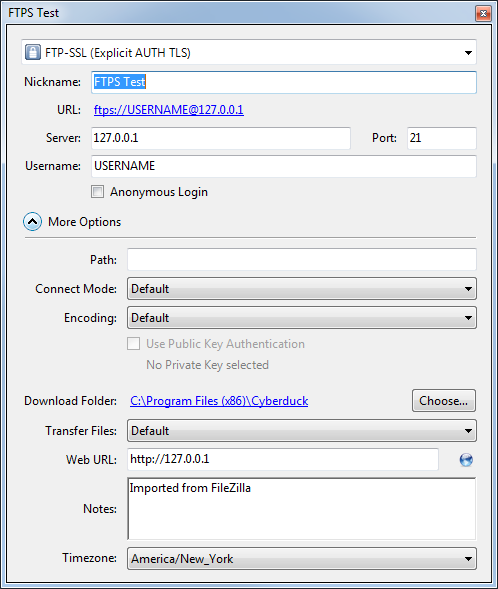
This works, no problem, none.  I then imported this site into Cyberduck, and can no longer connect.  After messing with settings, I come to find out that for this to work, I had to set the port to 21.  That’s it as far as I can tell.  Below is a screen shot of the settings screen that worked (outside of obviously changed details).  Weird, this is more of a note in case I run into this again.

Cyberduck_FTP_SSL_edit_bookmark_screen

Windows 7 Default New Mail Sound

Posted by Rose Bush on January 3rd, 2013

Is located here: C:\Windows\Media\Windows Notify.wav

Copyright © 2026 Edventures in Normalcy. All rights reserved.