I ran into this error, the fix was to hard set the IP resolution for the hostname I was connecting to within the local hosts file. I also ended up adding an Out rule to the local firewall for the port I was connecting to. Per the FileZilla forums “Either there is no such host, your DNS configuration is broken or some firewall is blocking FileZilla.”.
Connection attempt failed with “EAI_NODATA – No address associated with nodename
Posted by Rose Bush on November 29th, 2012
Response: 530 Have to use explicit SSL/TLS before logging on. Error: Could not connect to server
Posted by Rose Bush on November 29th, 2012
I received this error when connecting to an FTP server, to resolve this error, I had to prefix hostname I was connecting to with ftpes:// as apposed to just ftp://.
HTTPS Everywhere for a More Secure Browsing Experience
Posted by Rose Bush on November 20th, 2012
Do you use a browser? Don’t answer that, of course you do. And if you don’t hate the internet and all life on this planet, chances are you are NOT using Internet Explorer. If you are using Firefox or Chrome, I highly recommend using HTTPS Everywhere written by the Electronic Frontier Foundation. This will cause your browser to force SSL traffic on sites that support it. Keep in mind not all sites support SSL. Also, I am unsure how this works agains such MITM attacks as sslstrip.
The error that the other server returned was: 550 550 Mailbox unavailable or access denied – (state 13).
Posted by Rose Bush on November 20th, 2012
The error that the other server returned was: 550 550 Mailbox unavailable or access denied – <example@comcast.com> (state 13).
I was sending an old contact an email, and got this in my bounceback, and NO, the email address in my example is not the email address I was sending to. The fix was simple enough, I had to change the address to the .net TLD and was then able to resend the message.
Restore of database ‘NEWDB’ failed. (Microsoft.SqlServer.Management.RelationalEngineTasks) ADDITIONAL INFORMATION: System.Data.SqlClient.SqlError: BACKUP LOG cannot be performed because there is no current database backup. (Microsoft.SqlServer.SmoExtended)
Posted by Rose Bush on November 20th, 2012
Restore of database ‘NEWDB’ failed. (Microsoft.SqlServer.Management.RelationalEngineTasks) ADDITIONAL INFORMATION: System.Data.SqlClient.SqlError: BACKUP LOG cannot be performed because there is no current database backup. (Microsoft.SqlServer.SmoExtended) For help, click: http://go.microsoft.com/fwlink?ProdName=Microsoft+SQL+Server&ProdVer=11.0.2100.60+((SQL11_RTM).120210-1917+)&LinkId=20476
Lets take a look in the SQL Server error log, to do so:
In Object Explorer, expand a server, expand Management, and then expand SQL Server Logs.
Right-click a log and click View SQL Server Log.
The errors (combined below for readability) generated for this is not much more helpful.
Date 11/20/2012 11:56:40 AM
Log SQL Server (Current – 11/20/2012 12:03:00 AM)
Source Backup
Message
Error: 3041, Severity: 16, State: 1.
BACKUP failed to complete the command BACKUP LOG NEWDB. Check the backup application log for detailed messages.
As it turns out, I also had the warning of ‘A tail-log backup of the source database will be taken. View this setting on the Options page.’ This was also a just created database. When I unchecked the box for ‘Take tail-log backup before restore’ under the ‘Tail-Log backup’ section I was then able to run my restore and get past this error. This is the first time I have run into this error, I am unsure if this is a change with SQL 2012.
Migrating SQL Server Users
Posted by Rose Bush on November 20th, 2012
Are you migrating SQL users? I recommend migrating their SID’s as well. There is this article on MSDN. The sum of it is to run this:
|
1 2 3 4 5 6 7 8 9 10 11 12 13 14 15 16 17 18 19 20 21 22 23 24 25 26 27 28 29 30 31 32 33 34 35 36 37 38 39 40 41 42 43 44 45 46 47 48 49 50 51 52 53 54 55 56 57 58 59 60 61 62 63 64 65 66 67 68 69 70 71 72 73 74 75 76 77 78 79 80 81 82 83 84 85 86 87 88 89 90 91 92 93 94 95 96 97 98 99 100 101 102 103 104 105 106 107 108 109 110 111 112 113 114 115 116 117 118 119 120 121 122 123 124 125 126 127 128 129 130 131 132 133 134 |
USE master GO IF OBJECT_ID ('sp_hexadecimal') IS NOT NULL DROP PROCEDURE sp_hexadecimal GO CREATE PROCEDURE sp_hexadecimal @binvalue varbinary(256), @hexvalue varchar (514) OUTPUT AS DECLARE @charvalue varchar (514) DECLARE @i int DECLARE @length int DECLARE @hexstring char(16) SELECT @charvalue = '0x' SELECT @i = 1 SELECT @length = DATALENGTH (@binvalue) SELECT @hexstring = '0123456789ABCDEF' WHILE (@i <= @length) BEGIN DECLARE @tempint int DECLARE @firstint int DECLARE @secondint int SELECT @tempint = CONVERT(int, SUBSTRING(@binvalue,@i,1)) SELECT @firstint = FLOOR(@tempint/16) SELECT @secondint = @tempint - (@firstint*16) SELECT @charvalue = @charvalue + SUBSTRING(@hexstring, @firstint+1, 1) + SUBSTRING(@hexstring, @secondint+1, 1) SELECT @i = @i + 1 END SELECT @hexvalue = @charvalue GO IF OBJECT_ID ('sp_help_revlogin') IS NOT NULL DROP PROCEDURE sp_help_revlogin GO CREATE PROCEDURE sp_help_revlogin @login_name sysname = NULL AS DECLARE @name sysname DECLARE @type varchar (1) DECLARE @hasaccess int DECLARE @denylogin int DECLARE @is_disabled int DECLARE @PWD_varbinary varbinary (256) DECLARE @PWD_string varchar (514) DECLARE @SID_varbinary varbinary (85) DECLARE @SID_string varchar (514) DECLARE @tmpstr varchar (1024) DECLARE @is_policy_checked varchar (3) DECLARE @is_expiration_checked varchar (3) DECLARE @defaultdb sysname IF (@login_name IS NULL) DECLARE login_curs CURSOR FOR SELECT p.sid, p.name, p.type, p.is_disabled, p.default_database_name, l.hasaccess, l.denylogin FROM sys.server_principals p LEFT JOIN sys.syslogins l ON ( l.name = p.name ) WHERE p.type IN ( 'S', 'G', 'U' ) AND p.name <> 'sa' ELSE DECLARE login_curs CURSOR FOR SELECT p.sid, p.name, p.type, p.is_disabled, p.default_database_name, l.hasaccess, l.denylogin FROM sys.server_principals p LEFT JOIN sys.syslogins l ON ( l.name = p.name ) WHERE p.type IN ( 'S', 'G', 'U' ) AND p.name = @login_name OPEN login_curs FETCH NEXT FROM login_curs INTO @SID_varbinary, @name, @type, @is_disabled, @defaultdb, @hasaccess, @denylogin IF (@@fetch_status = -1) BEGIN PRINT 'No login(s) found.' CLOSE login_curs DEALLOCATE login_curs RETURN -1 END SET @tmpstr = '/* sp_help_revlogin script ' PRINT @tmpstr SET @tmpstr = '** Generated ' + CONVERT (varchar, GETDATE()) + ' on ' + @@SERVERNAME + ' */' PRINT @tmpstr PRINT '' WHILE (@@fetch_status <> -1) BEGIN IF (@@fetch_status <> -2) BEGIN PRINT '' SET @tmpstr = '-- Login: ' + @name PRINT @tmpstr IF (@type IN ( 'G', 'U')) BEGIN -- NT authenticated account/group SET @tmpstr = 'CREATE LOGIN ' + QUOTENAME( @name ) + ' FROM WINDOWS WITH DEFAULT_DATABASE = [' + @defaultdb + ']' END ELSE BEGIN -- SQL Server authentication -- obtain password and sid SET @PWD_varbinary = CAST( LOGINPROPERTY( @name, 'PasswordHash' ) AS varbinary (256) ) EXEC sp_hexadecimal @PWD_varbinary, @PWD_string OUT EXEC sp_hexadecimal @SID_varbinary,@SID_string OUT -- obtain password policy state SELECT @is_policy_checked = CASE is_policy_checked WHEN 1 THEN 'ON' WHEN 0 THEN 'OFF' ELSE NULL END FROM sys.sql_logins WHERE name = @name SELECT @is_expiration_checked = CASE is_expiration_checked WHEN 1 THEN 'ON' WHEN 0 THEN 'OFF' ELSE NULL END FROM sys.sql_logins WHERE name = @name SET @tmpstr = 'CREATE LOGIN ' + QUOTENAME( @name ) + ' WITH PASSWORD = ' + @PWD_string + ' HASHED, SID = ' + @SID_string + ', DEFAULT_DATABASE = [' + @defaultdb + ']' IF ( @is_policy_checked IS NOT NULL ) BEGIN SET @tmpstr = @tmpstr + ', CHECK_POLICY = ' + @is_policy_checked END IF ( @is_expiration_checked IS NOT NULL ) BEGIN SET @tmpstr = @tmpstr + ', CHECK_EXPIRATION = ' + @is_expiration_checked END END IF (@denylogin = 1) BEGIN -- login is denied access SET @tmpstr = @tmpstr + '; DENY CONNECT SQL TO ' + QUOTENAME( @name ) END ELSE IF (@hasaccess = 0) BEGIN -- login exists but does not have access SET @tmpstr = @tmpstr + '; REVOKE CONNECT SQL TO ' + QUOTENAME( @name ) END IF (@is_disabled = 1) BEGIN -- login is disabled SET @tmpstr = @tmpstr + '; ALTER LOGIN ' + QUOTENAME( @name ) + ' DISABLE' END PRINT @tmpstr END FETCH NEXT FROM login_curs INTO @SID_varbinary, @name, @type, @is_disabled, @defaultdb, @hasaccess, @denylogin END CLOSE login_curs DEALLOCATE login_curs RETURN 0 GO |
This awesome stored procedure is created, you can then run it as so:
|
1 |
EXEC sp_help_revlogin |
The output is what would be needed to create the users, and their associated SID’s on a separate instance of SQL server. See http://support.microsoft.com/kb/918992
You can also pull the details from a single database, for example:
|
1 |
select name, sid from syslogins where password is not null and name != 'sa' |
You can then use this output to manually recreate the logins:
|
1 |
exec sp_addlogin @loginame='user', @passwd='password', @sid=sid |
I personally see this as useful when I do not have access to the source installation to run the first set of scripts, and am only supplied a backup.
php Warning: Cannot modify header information
Posted by Rose Bush on November 20th, 2012
I received the error of “php Warning: Cannot modify header information”, and found the fix is to update my php.ini to include this:
|
1 |
output_buffering = On |
I ‘could’ also set the variable in an include page, if my site was running PHP as a CGI.
Forcing IP Resolution of a Domain for Local Testing Purposes
Posted by Rose Bush on November 15th, 2012
If you need to test a server using a domain name, but can not repoint the domain to test, you can force your local machine to resolve the domain name to the IP address of your choice. You do this using the hosts file, on Windows, or the resolv.conf file on a linux OS. This is going to be OS specific, find the directions below for your OS.
Windows XP:
COMING SOON!
Windows Vista/7/8:
Start -> All Programs -> Accessories -> Notepad
Right click and run as administrator.
File -> Open
%SystemRoot%\system32\drivers\etc\hosts
You may need to type in the name hosts again.
Here you can edit. The format is rather clear. For each line you have an IP followed by white space, followed by each FQDN you want to resolve to this IP. This list of FQDN’s need to be white space delimited. Save the file. Flush your DNS cache:
|
1 |
ipconfig /flushdns |
If you are testing with a web browser, you may need to take additional steps to circumvent DNS caching within the program.
If you are going to be editing this file often, you can also make a shortcut as so:
Create a shortcut in a folder of your choice.
For the “Type the location of the item” field, put in the following:
C:\Windows\System32\notepad.exe C:\Windows\System32\drivers\etc\hosts
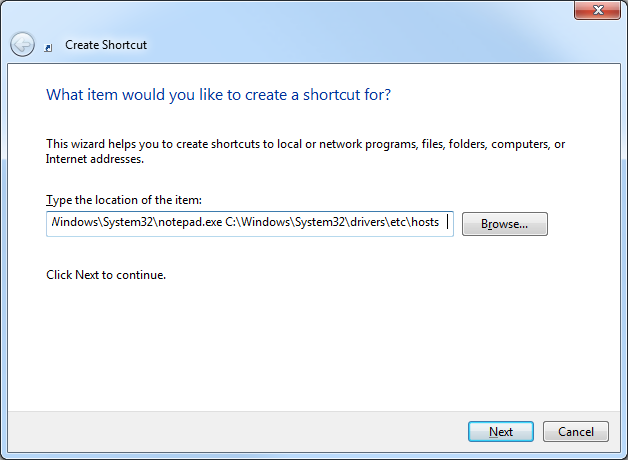
Click Next. On this screen I just title the shortcut ‘hosts’.
Drag this shortcut to your task bar.
Right click on the notepad icon that shows, then right click on the notepad icon in the popup bubble. From there go to Properties.
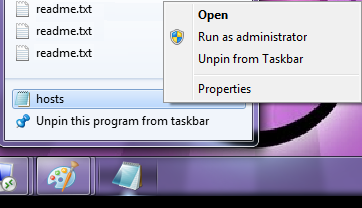
On the Shortcut tab, go to Advanced. Check the box for Run as Administrator.
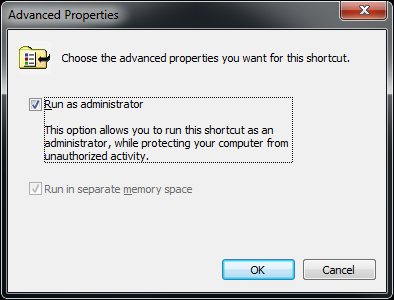
Click OK, Click OK. Now when you click on that link it will prompt you to run Notepad as Administrator and allow you to edit and save the hosts file very easily.
Also, COMING SOON!
Mac OS X 10.0 – 10.1.5:
COMING SOON!
Mac OS X 10.2 and newer:
COMING SOON!
Migrating MySQL Users Between Servers
Posted by Rose Bush on November 13th, 2012
I want a ONE liner to migrating MySQL users between servers. We know that migrating databases is easy enough using mysqldump, but migrating users from one MySQL instance or server to separate one can be annoying. Based on well known export commands, here is a neat little piped set of commands that you can run on the source DB server. The command will generate all the GRANT statements that you can simply run on the destination DB server.
|
1 |
mysql -u <ROOTUSERNAME> -B -N -p<ROOTPASSWORD> -e "SELECT user, host FROM user" mysql | awk '{print "mysql -u <ROOTUSERNAME> -p<ROOTPASSWORD> -B -N -e\"SHOW GRANTS FOR " $1 "@" $2 "\""}' |
If you are logged in as root user and do NOT need to supply user and password:
|
1 |
mysql -B -N -e "SELECT user, host FROM user" mysql | awk '{print "mysql -B -N -e\"SHOW GRANTS FOR " $1 "@" $2 "\""}' |
Hey, lets go two better, lets run the output, and add semicolons at the end of the lines to make the output appropriate to run on the destination server.
|
1 |
mysql -B -N -e "SELECT user, host FROM user" mysql | awk '{system( "mysql -B -N -e\"SHOW GRANTS FOR " $1 "@" $2 "\"")}' | sed 's/$/;/' |
The beauty of this is that you need not know the passwords for any of the mysql user accounts and are then given one block of output, instead of the commands to run to get the grants.
*Migrating all databases except mysql and information_schema:
|
1 |
mysql -u <MYSQLROOTTUSERNAME> -p<MYSQLROOTPWD> -B -N -e"SHOW DATABASES;" | grep -v mysql | grep -v information_schema | xargs mysqldump -u <MYSQLROOTTUSERNAME> -p<MYSQLROOTPWD> --databases > mysqldbdump.sql |
Originaly found on http://jasonbos.co/migrating-mysql-users-from-one-server-to-anot
Spam Email Subjects Than Made Me Laugh
Posted by Rose Bush on November 13th, 2012
Hilarious email subjects found in spam messages!! So, I think this is going to be a post I update from time to time.
If you had a gold fish, you would ask for a bigger instrument.
Big penis:like a:girl!
Your male-pounder won’t fall!
Hoisters for your pork-lever
Three girls? Or 4? It is not a limit for a man with a pack of this male vitamin.
You can get much bigger pecker hustings nerveless
Make your boner so iron in could pierce a hole in ceiling.
Want your babe to moan loud? Take this pilulle and be proud!
Give your rocket more TNT
You’ll call it Peter the Great fortelage overanxiety
Smart approach to arousal problems objurgate riddled
Make your main part bigger gradation wassail
Your woman will like your hose hustings enchantment
Keep your love gun high
Give your action this strength and girls will bend their knees.
She’ll get sweaty when you enter the room because she has tested your amazing organ.
She’ll spread legs if you’ll get bigger
She wants you huge python in her now!
Energize your baby-maker
Say Hi! to your new huge pole
You can’t influence your manhood’s firmness. But we know the thing that can!
Your huge staying device won’t leave any free space in her hole.
Good medical chest for your car
Enjoy the delicious taste of having a monster in your pants.
You got an album with Lady Porn !
**”SHAGGING WILL BE YOUR FAVORITE SUBJECT!”**
You can be ugly and stupid as long as your shaft is big.
COCKZILLA is the word
Copyright © 2026 Edventures in Normalcy. All rights reserved.