Edventures in Normalcy

MSSQL Backup all Non System Databases Scripted

Posted by Rose Bush on November 24th, 2015

Microsoft SQL Server backups, MSSQL Backup, process

  • Note: You may need to go to Tools > Options > Query Results > SQL Server > Results to Text in the Studio Manager and change the “Maximum number of characters displayed in each column to 1024” (default is 256). Also make sure you are outputting the results to text. If you do not do this prior, you run into the chance of either set of commands not outputting the full commands needed for the next step.
  • Also, you may need to open a New Query as the change ‘seems’ to only affect newly opened queries. The second pertinent setting, Open a new query window and ensure it has the focus, then go to Query > 249521. Here you can see the setting is located in 249521 > 249521. Change the Maximum number of characters displayed in each column the fields maximum of 8192.

The following command will generate a SQL script to back up all non system SQL databases. Be sure to replace the restore path. Make sure you set the results to text output.

Once the above query has been run, copy the output and run it as a new query on the source server (I migrate a lot, hence the terminology used).

Find the Default File Paths for a Given SQL Instance

Posted by Rose Bush on May 4th, 2015

Method 1 of 1?

Create the alias with cliconfg.exe

Posted by Rose Bush on May 4th, 2015

Option 2: Create the alias with cliconfg.exe
Log into the Application and/or front-end Web servers
Got to Start > cliconfg.exe (Note: it’s c-l-i-c-o-n-f-g-dot-e-x-e)

Then click on “Alias”:

If you already have an alias set up, it will show up there. Otherwise…
Click “Add”

Specify the port number and give it a name. That’s it!
Test your SQL Alias:
To test your SQL alias, create a Microsoft Data Link (udl) file on your desktop:

From your desktop, right click on the desktop and choose New > Text file
A new file named New Text Document.txt appears in the directory.
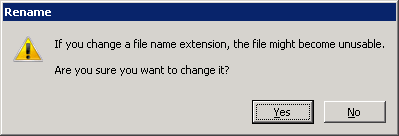
Rename this file to “TestDBConnection.udl”, removing all spaces. Be sure to change its file extension to .udl.
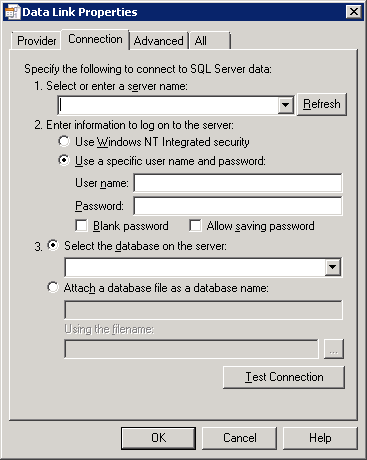
Open the file and, under Connection, type either the SQL server name or, if you are testing an SQL alias, the alias name.
Under 2, chose “Windows Authenticated security”
Click “refresh”
If the connection was successful, list of databases should appear in the dropdown menu under #3.
I have a separate blog post that covers the same steps for creating a udl file here. http://smallcitydesign.com/how-to-test-a-database-connection-from-an-application-server/

I want all DB’s moved, from SQL Server/Instance A to SQL Server/Instance B.  The easiest way to do this of course, is scripted :D.  Oh how I love the idea of automation.

Generate export script:

Use the output to backup the databases.

Then run the following command to get the import commands you would run on the destination instance:

SQL Server FAQ

Posted by Rose Bush on April 18th, 2013

I wanted a place to throw a lot of the high level SQL FAQ and answers for issues I come to.

v=sql.70 7
v=sql.80 2000
v=sql.90 2005
v=sql.100 2008
v=sql.105 2008R2
v=sql.110 2012
v=sql.120 2014
v=sql.130 2016

This site lists build versions, this is really useful for matching version to version by running the updates needed manually:

Microsoft SQL Server 2012, 2008R2, 2008, 2005, 2000 and 7.0 Builds

SQL Server 2012 msdn: Editions and Components of SQL Server 2012

SQL Server 2008 R2 msdn: Editions and Components of SQL Server 2008 R2

Server Editions:
*Datacenter
*Enterprise
*Standard

Specialized Editions:
*SQL Server Developer
*SQL Server Workgroup
*SQL Server Web
*SQL Server Express (SQL Server Express with Tools, SQL Server Express with Advanced Services)
*Compact 3.5 SP1 (x86) Compact 3.1 (x86)

SQL Server 2008 msdn: Editions and Components of SQL Server 2008

SQL Server 2005 msdn: Editions and Components of SQL Server 2005

Anything else was too old for my purposes.

~~~~~~~~~~~~~~~~~~~~~~~~~~~~~~~~~~~~~~~~~

MSSQL Data links:

http://en.wikipedia.org/wiki/Microsoft_SQL_Server

Deprecated Database Engine Features in SQL Server 2012
http://msdn.microsoft.com/en-us/library/ms143729.aspx

Build version list, you have a version number and want to know what updates are in there:
http://sqlserverbuilds.blogspot.com/

Features Supported by the EditionhereherehereherehereNOPENOPENOPE

SQL Server 2016 SQL Server 2014 SQL Server 2012 SQL Server 2008 R2 SQL Server 2008 2005 SQL Server 2000 SQL Server 7
Hardware and Software Requirements here here here here here 2005 NOPE NOPE
Editions and Components here here here here here 2005 NOPE NOPE

Hardware and Software Requirements for Installing SQL Server 2012
http://msdn.microsoft.com/en-us/library/ms143506.aspx

Features Supported by the Editions of SQL Server 2008 R2
http://msdn.microsoft.com/en-us/library/cc645993(v=sql.105).aspx

Features Supported by the Editions of SQL Server 2012 (FYI SQL web does support SQL profiler some how?)
http://msdn.microsoft.com/en-us/library/cc645993(v=sql.110).aspx

Features Supported by the Editions of SQL Server 2014
http://msdn.microsoft.com/en-us/library/cc645993(v=sql.120).aspx

Features Supported by the Editions of SQL Server 2016
http://msdn.microsoft.com/en-us/library/cc645993(v=sql.130).aspx

Features Supported by the Editions of SQL Server 2005
http://msdn.microsoft.com/en-us/library/ms143761(v=sql.90).aspx

Prevent Truncation for Dynamically Generated T-SQL Results in SSMS
https://www.edwinbush.com/prevent-truncation-for-dynamically-generated-t-sql-results-in-ssms/

Migrating SQL Server Users
https://www.edwinbush.com/migrating-sql-server-users/

Easily test connectivity to MSSQL Server

Posted by Rose Bush on April 9th, 2013

I have run into a number of cases where I want to test a connection to a SQL (MSSQL) Server without having to resort to code. To do so is rather straight forward:

Create a new file, a simple txt file is fine, and rename the document to “TestDBConnection.udl” sans quotes and spaces.

testConnect_01

Be sure to change its file extension to .udl as many windows systems will not show you the extension. If you are in Explorer in Windows 7 I can tell you the commands to get to the setting are Alt, T, O, CTRL + Tab. Here you can see the ‘Hide extensions for known file types’.
Open the file:

testMssqlConnection_01

Under Connection, enter the SQL server hostname or IP

If testing a SQL alias:
Enter information to log on to the server”
*Choose Windows Authenticated security
Click the Refresh button.
If a successful connection was made, a list of databases will be accessible under section 3.

Otherwise, test as you would guess, it is fairly clear from here.

Adding the Administrators group within SQL Server

Posted by Rose Bush on April 1st, 2013

If you want to add the group Administrators to SQL so that any user of the Administrators Group can use SQL server, the below code, once executed, will perform this for you:

Determining Microsoft SQL Server Version

Posted by Rose Bush on March 26th, 2013

Open up SQL Server Management Studio and connect to the Database Engine (connection not pictured)

SMSSLink

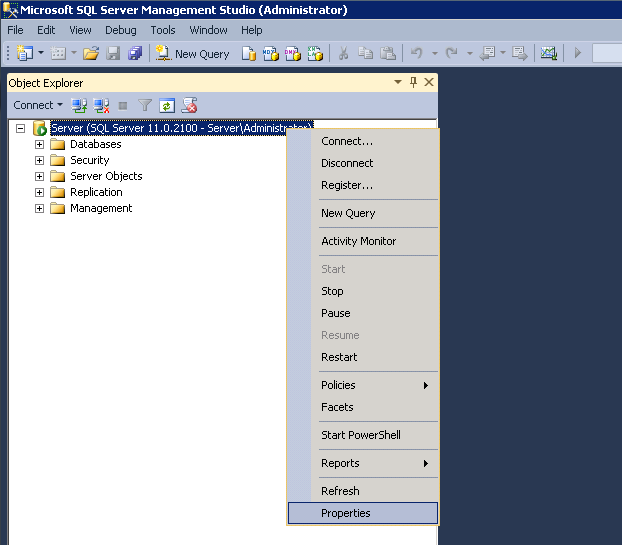
Right click on the instance and choose Properties from the menu.

SQLServerVersion_01

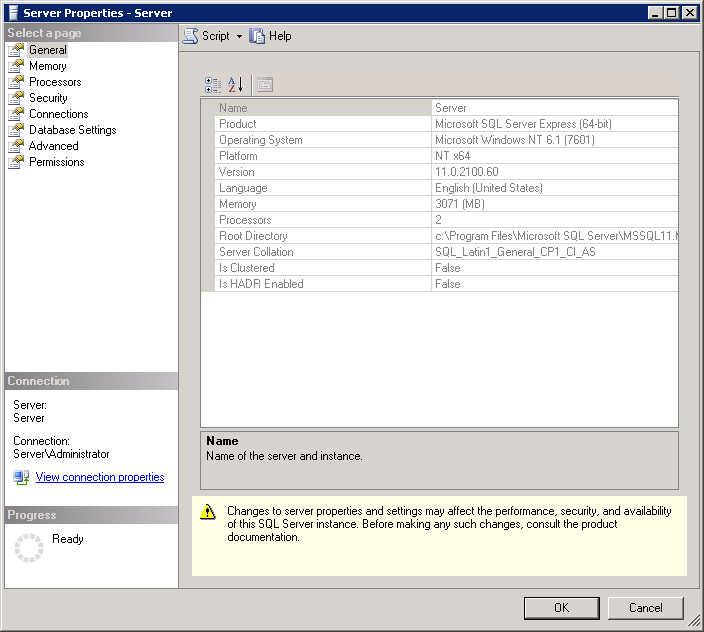
Here you can see the Product and the Version, as both are important details. If you are noting this for future reference  I recommend noting the entire line of each.  Keep in mind the Version does change as upgrades to SQL server are installed through KB’s and Windows Updates.

SQLServerVersion_02

If you are trying to calculate total disk space in use by all databases within a given MSSQL instance, you can use the following script to determine this space.

It has been said that “Sys.Master_files is a server-wide view that lists every file in every DB. It’s available from SQL Server 2005 onward.”

Update the Schema on a Stored Procedure

Posted by Rose Bush on February 26th, 2013

To update the schema of a single stored procedure, once on the database in question, you would need to run the following line:

Copyright © 2026 Edventures in Normalcy. All rights reserved.