Edventures in Normalcy

I have recently run into an issue where I run one script that generated another (T-SQL), and for some reason, some of the output is cut off or truncated in SSMS.  I want to prevent this.  This truncation is caused by the settings below being too low for your case.  Altering these setting will significantly decrease the chance of truncation when creating T-SQL scripts in a loop.  Initially I was changing this in one place, and still had the truncation effect me.  Silly me, there are TWO place where you have to change the limit in order to make it function in all scenarios.

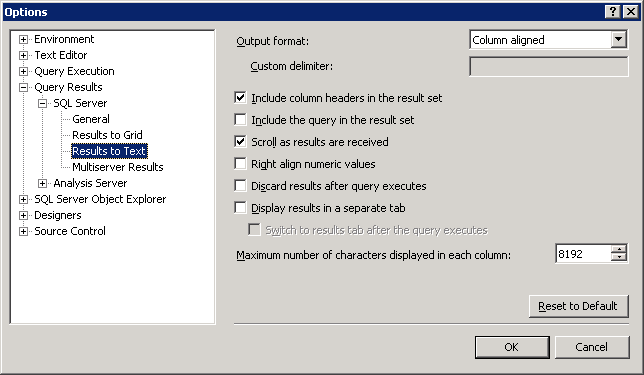
This one I do catch, Tools > Options. Expand the path of Query Results > SQL Server > Results to Text and change the Maximum number of characters displayed in each column to the fields maximum of 8192.
SSMS_Tools_Options_Query_Results_to_Text

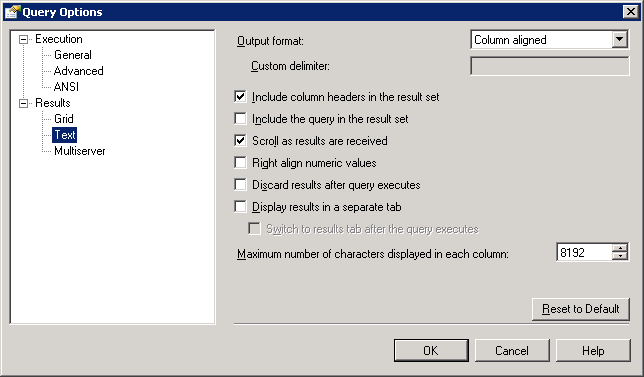
The second setting is the one I tend to fail to remember.  This is not just because the Query menu does not show in SSMS if a query window is not open or if you have clicked off the query window to the Object Explorer pane, for example. Open a new query window and ensure it has the focus, then go to Query > Query Options. Here you can see the setting is located in Results > Text.  Change the Maximum number of characters displayed in each column the fields maximum of 8192.
SSMS_Query_Options_Results_Text

“NOTE: Keep in mind that when you make a setting change for Query Options, it only applies to that immediate window and any new windows you open. It will not affect the options for any other query windows which were open at the time but did not have the focus.”

ColdFusion does not create the proper tables for client variable storage when using MySQL as the database engine.  This is valid in ColdFusion 9 and also still present in ColdFusion 10.  These tables should be created manually for client variable storage to function.

Two tables are required. CDATA and CGLOBAL. Details about theses tables are as follows:

The CDATA table must have the following columns:

Column | Data type

cfid | CHAR(64), TEXT, VARCHAR, or any data type capable of taking variable length strings up to 64 characters

app | CHAR(64), TEXT, VARCHAR, or any data type capable of taking variable length strings up to 64 characters

data | MEMO, LONGTEXT, LONG VARCHAR, CLOB, or any data type capable of taking long, indeterminate-length strings


The CGLOBAL table must have the following columns:

Column | Data type

cfid | CHAR(64), TEXT, VARCHAR, or any data type capable of taking variable length strings up to 64 characters

data | MEMO, LONGTEXT, LONG VARCHAR, CLOB, or any data type capable of taking long, indeterminate-length strings

lvisit | TIMESTAMP, DATETIME, DATE, or any data type that stores date and time values


If the database has not yet been created, you can create the database and tables with this:

To create the tables, the following queries can be used (this is if you have already created the database and have an appropriately privileged user that is able to access the database):

Restore of database ‘NEWDB’ failed. (Microsoft.SqlServer.Management.RelationalEngineTasks) ADDITIONAL INFORMATION: System.Data.SqlClient.SqlError: BACKUP LOG cannot be performed because there is no current database backup. (Microsoft.SqlServer.SmoExtended) For help, click: http://go.microsoft.com/fwlink?ProdName=Microsoft+SQL+Server&ProdVer=11.0.2100.60+((SQL11_RTM).120210-1917+)&LinkId=20476

Lets take a look in the SQL Server error log, to do so:
In Object Explorer, expand a server, expand Management, and then expand SQL Server Logs.
Right-click a log and click View SQL Server Log.

The errors (combined below for readability) generated for this is not much more helpful.

Date 11/20/2012 11:56:40 AM
Log SQL Server (Current – 11/20/2012 12:03:00 AM)

Source Backup

Message
Error: 3041, Severity: 16, State: 1.

BACKUP failed to complete the command BACKUP LOG NEWDB. Check the backup application log for detailed messages.


As it turns out, I also had the warning of  ‘A tail-log backup of the source database will be taken.  View this setting on the Options page.’  This was also a just created database.  When I unchecked the box for ‘Take tail-log backup before restore’ under the ‘Tail-Log backup’ section I was then able to run my restore and get past this error.  This is the first time I have run into this error, I am unsure if this is a change with SQL 2012.

Migrating SQL Server Users

Posted by Rose Bush on November 20th, 2012


Are you migrating SQL users?  I recommend migrating their SID’s as well.  There is this article on MSDN.  The sum of it is to run this:


This awesome stored procedure is created, you can then run it as so:


The output is what would be needed to create the users, and their associated SID’s on a separate instance of SQL server. See http://support.microsoft.com/kb/918992

You can also pull the details from a single database, for example:

You can then use this output to manually recreate the logins:

I personally see this as useful when I do not have access to the source installation to run the first set of scripts, and am only supplied a backup.


Xp_cmdshell and Errors in SQL server.

Posted by Rose Bush on November 12th, 2012

This article is essentially a combination of two articles I had read online. One made it easy to find the errors and the other made it easy to find the fix, but I wanted one place where I could find BOTH. What do you need in place in order to use xp_cmdshell? I warn you, there are obvious security risks and implications for going this route. (I’m not recommending usage of xp_cmdshell in general, and frankly have no clue how to use it, but you don’t need to know how to use it to enable it) We first need to think about what happens here, from an architectural level:

A user who has logged in to SQL Server executes xp_cmdshell. For this, SQL Server need to spawn a process in Windows. A process in Windows need to execute in a Windows user account. How does SQL Server know what Windows account is to be used? If the SQL Server login who is executing xp_cmdshell is sysadmin, then SQL Server will use the service account (it will not “pretend to be somebody else” or emulate another user). However, if the login is not sysadmin, then one would need to configure what Windows account to be used (using sp_xp_cmdshell_proxy_account). Note that this configuration is the same for all non-sysadmins. But there’s a little bit more to it than a single setting. Below is an outline of what needs to be done. Step 2 and 3 are only needed if the one who is to execute xp_cmdshell isn’t sysadmin. Note that the steps don’t have to be performed in the order listed below.

We need to allow usage of xp_cmdshell in general (on 2005 or 2008). Use “Surface Area Configuration” or sp_configure to perform this. We need to have a user in the master database which has execute permission on xp_cmdshell. If you are uncertain about the difference between logins and users, you should read up about it in BOL. We need to say what Windows account should be used when a non-sysadmin user is executing xp_cmdshell.

For users that are not members of the sysadmin role on the SQL Server instance, as mentioned above, you need to do the following actions to grant access to the xp_cmdshell extended stored procedure.

Below are the Errors thrown and the TSQL script correcting said error, that enables this:

(1) Enable the xp_cmdshell procedure

*Msg 15281, Level 16, State 1, Procedure xp_cmdshell, Line 1 SQL Server blocked access to procedure ‘sys.xp_cmdshell’ of component ‘xp_cmdshell’ because this component is turned off as part of the security configuration for this server. A system administrator can enable the use of ‘xp_cmdshell’ by using sp_configure. For more information about enabling ‘xp_cmdshell’, see “Surface Area Configuration” in SQL Server Books Online.*
Fix:

(2) Create a login for the non-sysadmin user that has public access to the master database

*Msg 229, Level 14, State 5, Procedure xp_cmdshell, Line 1 The EXECUTE permission was denied on the object ‘xp_cmdshell’, database ‘mssqlsystemresource’, schema ‘sys’.*
Fix:

(3) Grant EXEC permission on the xp_cmdshell stored procedure

*Msg 229, Level 14, State 5, Procedure xp_cmdshell, Line 1 The EXECUTE permission was denied on the object ‘xp_cmdshell’, database ‘mssqlsystemresource’, schema ‘sys’.*
Fix:

(4) Create a proxy account that xp_cmdshell will be run under using sp_xp_cmdshell_proxy_account

*Msg 15153, Level 16, State 1, Procedure xp_cmdshell, Line 1 The xp_cmdshell proxy account information cannot be retrieved or is invalid. Verify that the ‘##xp_cmdshell_proxy_account##’ credential exists and contains valid information.*
Fix:

Adding a new user to SQL server 2005, 2008, 2010

Posted by Rose Bush on November 7th, 2012

Make sure you give the user sufficient permissions to the DB they are being given access to, typically being db_datareader, db_datawriter, db_ddladmin, and public.


There is also a SQL statement you can run:

I have not tested this script, use at your own risk.  In my example, I give the last two roles that seem to be not included in scripts mentioned on other sites.

The following text will output the SQL statement to recreate all databases:

You will need to set Results to Text so that the output is correctly formatted. You can then copy users/logins as seen here: http://support.microsoft.com/kb/918992.

Copyright © 2026 Edventures in Normalcy. All rights reserved.